 ## Setting up your AI work environment
AI knows nothing about your organization, your clients, or your workflows. By [creating context documents](/knowledge-base/context-management-ai-workspace/) (descriptions of your role, your team, and how you work) you give AI the information it needs to produce relevant output.
During the course you'll set up a work environment with three folders: a **Prompt Library** with reusable prompts per task type, a **Projects folder** for project-specific information, and a **My Context** folder with documents about your role, your organization, and how you work. This structure means you never start from scratch — you build on what you already have.
## From prompt to work habit
The course is deliberately spread over multiple weeks. Workshop 1 lays the foundation: how AI language models work, where they fail, and how you steer them with the four prompt building blocks. Between sessions you apply what you've learned in your own work. Workshop 2 builds on that with context documents and reusable prompts. The coaching session afterward checks whether your new routines are actually sticking.
The goal isn't that you understand how prompting works. The goal is that your daily way of working changes. That takes the [three skills](/knowledge-base/three-essential-ai-skills/) every knowledge worker needs: breaking down tasks, making context explicit, and critically evaluating output.
## Copilot Skills Online Training
> Online AI training for 40-75 participants per cohort. Up to four cohorts parallel per week, each with a dedicated facilitator plus assistant team.
**Price:** €89 p.p. · **Duration:** 4 hours online + optional coaching · **Format:** online
**URL:** https://copilot-academy.com/training/copilot-skills-online-training/
## Who is this training for?
For organizations that need to train a lot of people at once. Whole departments in a month, or an organization-wide AI adoption you manage centrally.
This is an online variant of our [AI Skills Fundamentals](/training/microsoft-copilot-fundamentals/), adapted for larger groups. Same learning goals, different approach. More people at once, lower per-head cost, less individual attention. Pick this variant when breadth matters more than depth, and when your per-person budget has to stay under EUR 150.
## Up to 1200 people per month
You can run four cohorts in parallel per week, each with 40-75 participants and a dedicated facilitator plus assistant team. That is 300 participants per week. In a month we train 1200 people this way, with no quality drop per session.
Each cohort gets two 2-hour sessions, a week apart. You can schedule them in parallel across different days and teams, or sequentially if you want to pilot the format first.
At 10 cohorts or more the per-participant price drops to EUR 89. That is how organizations like Dura Vermeer (3 cohorts of 45) have used this format.
## Setting up your AI work environment
AI knows nothing about your organization, your clients, or your workflows. By [creating context documents](/knowledge-base/context-management-ai-workspace/) (descriptions of your role, your team, and how you work) you give AI the information it needs to produce relevant output.
During the course you'll set up a work environment with three folders: a **Prompt Library** with reusable prompts per task type, a **Projects folder** for project-specific information, and a **My Context** folder with documents about your role, your organization, and how you work. This structure means you never start from scratch — you build on what you already have.
## From prompt to work habit
The course is deliberately spread over multiple weeks. Workshop 1 lays the foundation: how AI language models work, where they fail, and how you steer them with the four prompt building blocks. Between sessions you apply what you've learned in your own work. Workshop 2 builds on that with context documents and reusable prompts. The coaching session afterward checks whether your new routines are actually sticking.
The goal isn't that you understand how prompting works. The goal is that your daily way of working changes. That takes the [three skills](/knowledge-base/three-essential-ai-skills/) every knowledge worker needs: breaking down tasks, making context explicit, and critically evaluating output.
## Copilot Skills Online Training
> Online AI training for 40-75 participants per cohort. Up to four cohorts parallel per week, each with a dedicated facilitator plus assistant team.
**Price:** €89 p.p. · **Duration:** 4 hours online + optional coaching · **Format:** online
**URL:** https://copilot-academy.com/training/copilot-skills-online-training/
## Who is this training for?
For organizations that need to train a lot of people at once. Whole departments in a month, or an organization-wide AI adoption you manage centrally.
This is an online variant of our [AI Skills Fundamentals](/training/microsoft-copilot-fundamentals/), adapted for larger groups. Same learning goals, different approach. More people at once, lower per-head cost, less individual attention. Pick this variant when breadth matters more than depth, and when your per-person budget has to stay under EUR 150.
## Up to 1200 people per month
You can run four cohorts in parallel per week, each with 40-75 participants and a dedicated facilitator plus assistant team. That is 300 participants per week. In a month we train 1200 people this way, with no quality drop per session.
Each cohort gets two 2-hour sessions, a week apart. You can schedule them in parallel across different days and teams, or sequentially if you want to pilot the format first.
At 10 cohorts or more the per-participant price drops to EUR 89. That is how organizations like Dura Vermeer (3 cohorts of 45) have used this format.
A workspace your team can use right away
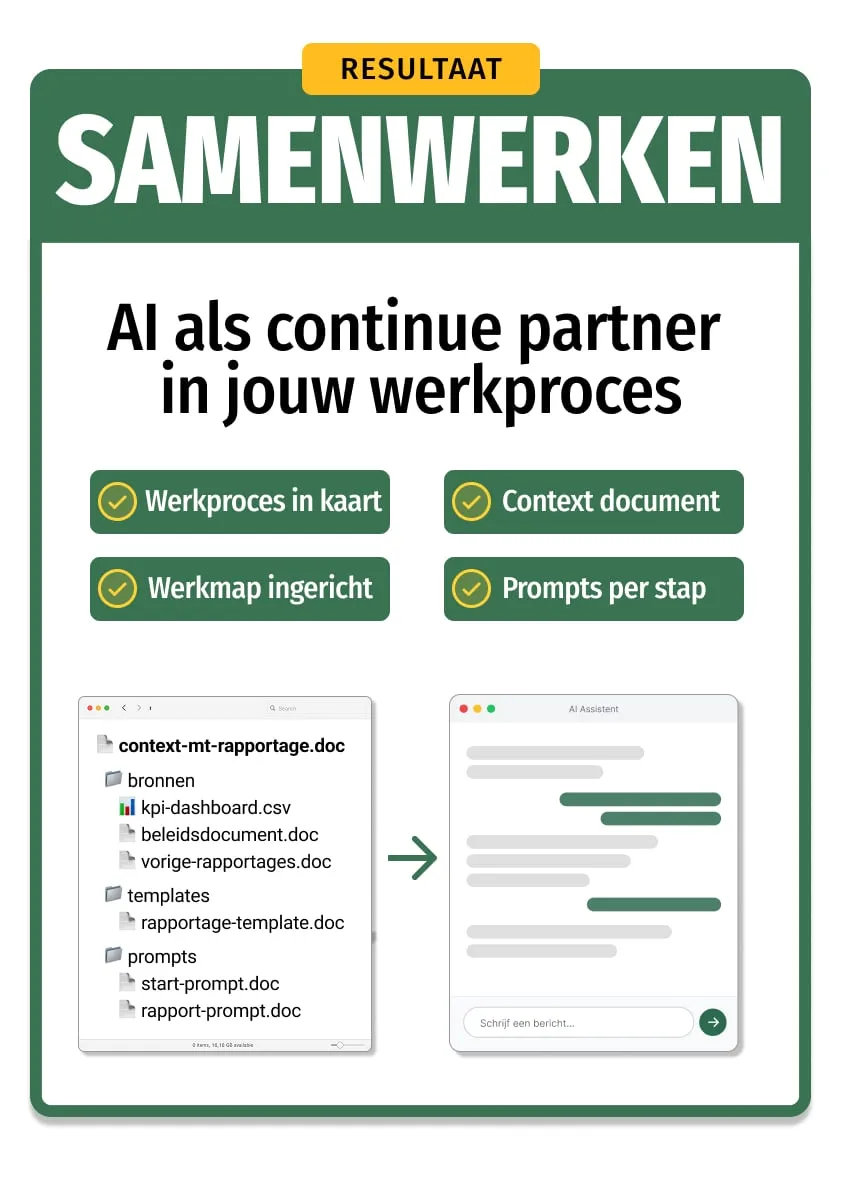
After the course you'll have a complete workspace for one workflow: a context document that tells AI what it needs to know, sources and templates for each step, and tested prompts your colleagues can pick up and run with.
Initial setup: 30-60 min. Then 80% reusable.
 ## AI Knowledge Base Training
> Build a working AI knowledge base for your team in 4 hours. You'll inventory sources, make documents AI-readable, and test with real work questions.
**Price:** €2.450 per group · **Duration:** 4 hours · **Format:** in-person
**URL:** https://copilot-academy.com/training/ai-knowledge-base/
## Why a knowledge base?
AI knows a lot about the world, but nothing about your organization. Your processes, templates, guidelines, and unwritten rules are behind a login or inside someone's head. Every time you write a prompt, you're starting from scratch.
A knowledge base solves that. You gather the documents AI needs, make them readable, and write a context document that ties everything together. The result: you hand AI a task and get an answer that sounds like it came from a colleague.
## How the training works
The session starts with a live demo: the same task, first without context, then with a knowledge base. The difference is immediately obvious.
Then you work in pairs or trios around a shared topic. On a canvas you map out which sources AI needs and which unwritten knowledge isn't captured anywhere. You write a context document and learn four techniques to convert PDFs, spreadsheets, and presentations into text a language model can actually work with, without losing information.
The heart of the course is two build-test loops. You build a first version, test it with a real task, spot the gaps, improve, and test again. The jump from test 1 to test 2 is the proof point. At the end, each team presents their knowledge base and everyone creates an action plan.
## AI Knowledge Base Training
> Build a working AI knowledge base for your team in 4 hours. You'll inventory sources, make documents AI-readable, and test with real work questions.
**Price:** €2.450 per group · **Duration:** 4 hours · **Format:** in-person
**URL:** https://copilot-academy.com/training/ai-knowledge-base/
## Why a knowledge base?
AI knows a lot about the world, but nothing about your organization. Your processes, templates, guidelines, and unwritten rules are behind a login or inside someone's head. Every time you write a prompt, you're starting from scratch.
A knowledge base solves that. You gather the documents AI needs, make them readable, and write a context document that ties everything together. The result: you hand AI a task and get an answer that sounds like it came from a colleague.
## How the training works
The session starts with a live demo: the same task, first without context, then with a knowledge base. The difference is immediately obvious.
Then you work in pairs or trios around a shared topic. On a canvas you map out which sources AI needs and which unwritten knowledge isn't captured anywhere. You write a context document and learn four techniques to convert PDFs, spreadsheets, and presentations into text a language model can actually work with, without losing information.
The heart of the course is two build-test loops. You build a first version, test it with a real task, spot the gaps, improve, and test again. The jump from test 1 to test 2 is the proof point. At the end, each team presents their knowledge base and everyone creates an action plan.
 ## Copilot Excel & Data Training
> Learn to use AI for data analysis and Excel work, from generating formulas to analyzing datasets and creating visualizations.
**Price:** €2.450 per group · **Duration:** 3 hours · **Format:** blended
**URL:** https://copilot-academy.com/training/copilot-excel-ai-training/
## AI for data analysis and Excel work
Excel is still the workhorse for many professionals. But building complex formulas, cleaning datasets, and compiling reports eats up hours. With AI you can automate the routine work and focus on the analysis itself.
### Where AI makes the difference in Excel
In this course you'll learn to use AI for the tasks that currently take you the most time:
- **Generating formulas**: describe what you want to calculate in plain language and let AI build the formula. From nested IF statements to complex VLOOKUP combinations.
- **Cleaning data**: inconsistent formatting, missing values, duplicates. AI helps you whip a dataset into shape in minutes instead of hours.
- **Running analyses**: setting up pivot tables, spotting trends, flagging outliers. You'll learn to ask AI the right questions about your data.
- **Creating visualizations**: from raw numbers to clear charts. AI picks the right chart type and formats the result.
### Copilot in Excel vs. ChatGPT
Both tools are useful for data work, but in different ways. Copilot works directly inside your spreadsheet — it can insert formulas, add columns, and generate charts without leaving Excel. ChatGPT is stronger at explaining complex formulas, writing VBA macros, and analyzing data you paste in as text.
In this course you'll learn when to reach for which tool and how to combine them for the best result.
### How the course works
We work with your own data as much as possible (anonymized where needed). You'll go through four exercises: cleaning a dataset, running an analysis, generating a report, and optimizing an existing spreadsheet. Each exercise builds on templates you can reuse right away.
### What you walk away with
You'll receive a **formula library** with the most commonly used AI-generated formulas by category (finance, HR, operations) and **analysis templates** you can use as a starting point for your own projects.
Want to learn more about [writing effective prompts for structured work](/knowledge-base/effective-prompting-for-teams/)? The TCRF framework we describe in that article applies to data work too.
---
# Knowledge Base
## How to Copy a Webpage as Plain Text (for AI)
> Cookie banners, menus, chat widgets, ads. Copy-pasting a regular webpage into AI usually gives you junk. Two ways to get clean text instead.
**Author:** Casimir Morreau · **Date:** 2026-05-12
**URL:** https://copilot-academy.com/knowledge-base/copy-webpage-as-plain-text-for-ai/
## The problem: a webpage isn't really text
You copy a page from a company website, paste it into Copilot, and ask for a summary. The answer starts with "Skip to main content" and ends with the cookie policy. Half of what you pasted was navigation, footer, chat widget, and ad copy.
A language model doesn't see a page. It sees a wall of text with no distinction between content and interface. The less noise you feed in, the better the answer. Here are two ways to extract just the content.
## Option 1: Immersive Reader in Microsoft Edge
Edge has a button that strips a page down to its readable content. No menus, no banners, no ads. Just the text.
1. Open the page in Edge
2. Click the book icon in the address bar (or press F9)
3. Choose "Immersive reader"
4. Select all (Cmd+A or Ctrl+A), copy, paste into your AI
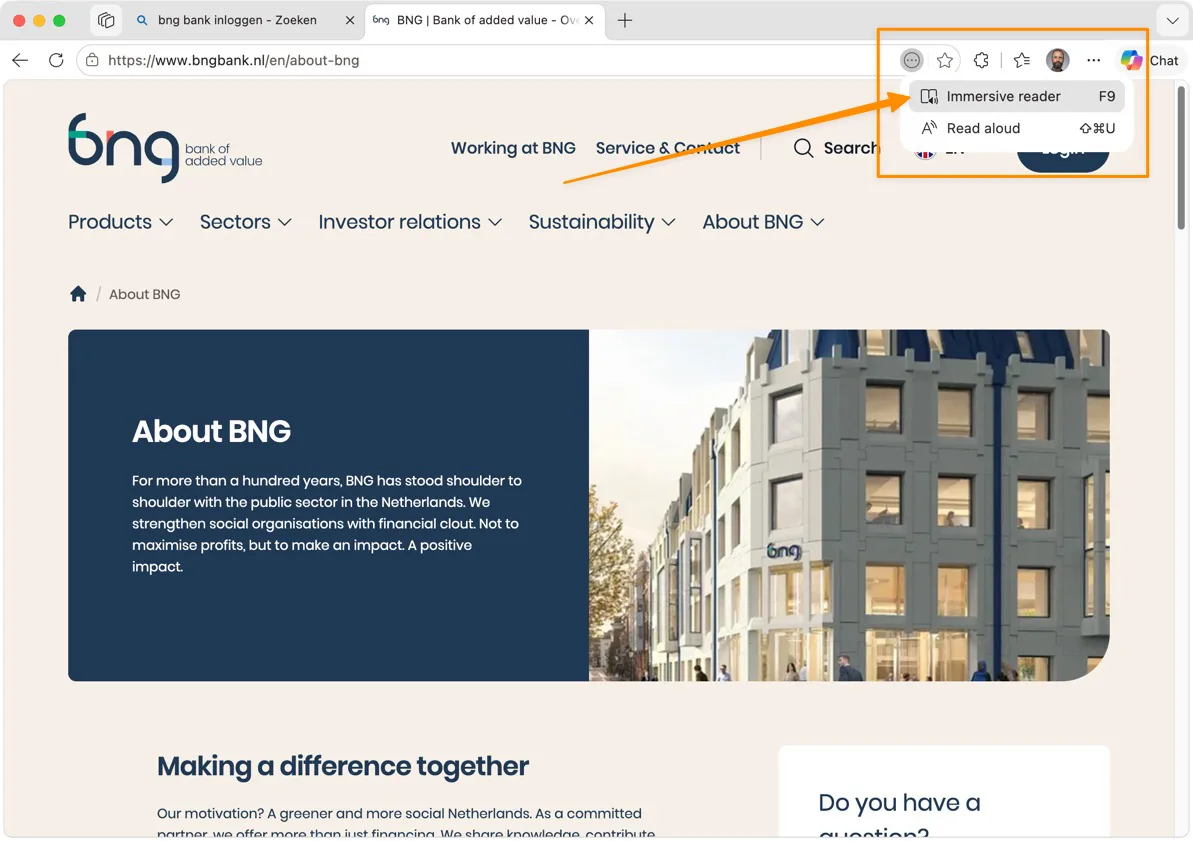
What you get back is the page without formatting or interface elements. Works on most news pages, knowledge bases, and articles. On heavy web apps (dashboards, forms) the button sometimes doesn't appear, because there's no clear "reading content" for Edge to extract.
## Option 2: defuddle.md in front of the URL
Sometimes you don't want to click buttons, and sometimes you're not using Edge. There's a trick that works in any browser: put `https://defuddle.md/` in front of the URL.
So instead of:
```
https://www.bngbank.nl/en/about-bng
```
You go to:
```
https://defuddle.md/https://www.bngbank.nl/en/about-bng
```
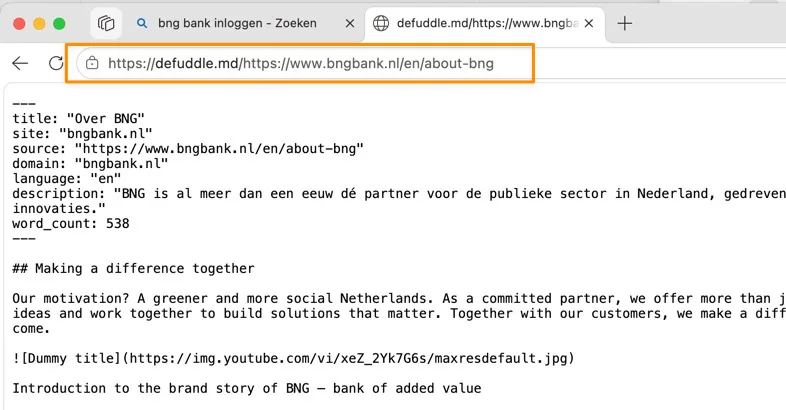
What comes back is markdown: the text with headings, lists, and links intact, without the rest of the page. At the top you get useful metadata (title, source, language, word count) that you can copy along into your AI.
Two alternatives that do the same thing:
- `https://markdown.new/[url]`
- `https://r.jina.ai/[url]`
Which one you pick is taste. Defuddle gives slightly cleaner output, Jina sometimes handles JavaScript-heavy pages better.
## When to use which
| Situation | Method |
|-----------|--------|
| One page, quick summary | Immersive Reader |
| Behind a login or paywall | Immersive Reader (you're already signed in) |
| No Edge at hand | defuddle.md in front of the URL |
| Page needs JavaScript to load | r.jina.ai in front of the URL |
| You want to save the text as markdown | defuddle.md (save the file) |
## Why this matters
A lot of teams paste pages straight into Copilot or ChatGPT and then wonder why the answer is messy. The input is messy. A language model doesn't distinguish between "the article" and "the button in the navigation" unless you draw that line for it.
This is part of [context management](/knowledge-base/context-management-ai-workspace/): the content you give AI shapes the answer as much as the question you ask. Clean input, better result.
The same reason you [convert PDFs to plain text](/knowledge-base/why-pdfs-dont-work-with-ai/) before handing them to AI applies to webpages. It takes ten seconds. It saves you an unusable answer.
## Building Your AI Knowledge Base: From Scattered Documents to a Working Memory
> AI knows nothing about your organization. A knowledge base changes that. But most documents aren't AI-ready. Here's how to fix them.
**Author:** Casimir Morreau · **Date:** 2026-03-04
**URL:** https://copilot-academy.com/knowledge-base/building-an-ai-knowledge-base/
## AI has no memory of your organization
A language model has read billions of texts. It knows what customer data is, how marketing campaigns work, and roughly what a good strategy looks like. But it knows nothing about *your* customer data, *your* campaigns, or *your* strategy.
Every time you open a new chat, the model starts with a blank slate. It doesn't know your internal jargon. It doesn't know that client X gets a special discount, that your marketing team distinguishes between brand A and brand B, or that your survey results from last quarter revealed a shift in audience behavior.
That's the fundamental problem. And the solution isn't writing better prompts. The solution is a **knowledge base**: a structured collection of documents that provides the language model with everything it's missing.
## What exactly is an AI knowledge base?
The definition is short: **all the information a language model needs but doesn't have.**
That sounds broad, and it is. In practice, it includes things like: who you are and which brands you run. Objectives, KPIs, target audience profiles. Campaign results and A/B test outcomes. How you set up a campaign, which steps you always follow. Price lists, customer profiles, discount agreements. And perhaps the most valuable: the lessons from one campaign that you want to carry into the next.
This isn't a database dump. It's the knowledge your team carries in their heads but never writes down. Every organization has this: implicit agreements, unwritten rules, nuances you pick up after three months on the job. You need to make that knowledge explicit, because a language model won't pick it up on its own.
## Why your documents aren't AI-ready
Here's where most teams hit a wall. You have mountains of information: strategy decks in Google Slides, campaign reports as PDFs, rates in Excel, project plans in PowerPoint. The problem: those formats were made for people, not for AI.
### PDF: unreliable for structured data
A [PDF looks clear and organized to us](/knowledge-base/why-pdfs-dont-work-with-ai/). Nicely formatted, tables neatly aligned, logo in the corner. But for a language model, a PDF is a disaster. Tables shift, columns bleed into each other, numbers jump across pages. The model hallucinates numbers it can't read properly. Prices, percentages, customer IDs: exactly the data that matters.
### Plain text: a world of difference
Convert that same document to plain text with headings and structure (markdown or a Google Doc), and accuracy goes up dramatically.
Why? Language models are trained on text. They understand headings, bullet points, and tables in text format. They don't have to guess where one column ends and the next begins. It's the content that counts, not the formatting.
### The practical approach
You don't need to convert everything. Focus on your **core documents**: the 10 to 15 files you use most often. Your brand strategy, your campaign blueprint, your rates, your target audience profile. Make those AI-ready. The rest you can attach as needed.
There are several ways to convert. Have Google Slides? Let Gemini read them and convert to structured text. The model extracts the text and also describes what it sees in visual elements (charts, diagrams, photos). Have a PDF? Upload it and ask for conversion to "raw markdown." But better yet: use the original source file (the Word document, the Google Sheet) and work from there. Export Excel and Sheets to CSV or copy as text. Tables in plain text work just fine.
**Tip**: set Google Docs to "pageless" mode (File > Page setup). You don't need page breaks. It's about the text, not how it looks on paper.
## Two types of documents you need
In practice, you'll quickly notice you're building two different types of documents. They're often confused, but the distinction matters.
### 1. Context documents
A [context document](/knowledge-base/context-management-ai-workspace/) describes the *content*: who you are, what you do, how you work. It's the knowledge itself.
Examples:
- "This is brand X. The target audience is Y. The strategy for 2026 focuses on Z. Our KPIs are..."
- "This is our campaign team. Colleague A handles social, colleague B handles print. Our planning runs quarterly."
- "Client A gets a 20% discount. This was decided in Q3 2025 by [name], reason: multi-year contract."
That last point is important. Many organizations document *what* they decided, but not *why*. That discount lives somewhere in a spreadsheet, but the reasoning is nowhere to be found. The language model then assumes all clients get a 20% discount. That's exactly the kind of mistake you want to prevent.
### 2. Navigation documents
A navigation document describes the *structure*: what lives where, how the knowledge base is organized, and which document wins when there are contradictions.
This is what Claude calls a `CLAUDE.md` file, and Gemini serves a similar function. It tells the model: "In folder 1 you'll find customer data. In folder 2 you'll find rates. The document `rates-2026.md` is the single source of truth for pricing."
**Single source of truth** is a concept you'll find yourself using a lot. If three places in your knowledge base say something different about course duration (twice three hours, three times two hours, twice 2.5 hours), you need to specify somewhere which document holds the truth. Otherwise the model picks at random and you get inconsistent output.
## You stay in the driver's seat
There's a lot of hype about AI agents that work completely on their own. Answering emails, setting up campaigns, running analyses. In practice, it works differently.
The approach that actually works is somewhere in the middle: **you stay in the loop**. The model does the prep work: searching your knowledge base, retrieving relevant documents, drafting a first version. But you evaluate the result and decide what happens next.
That's called "agentic" work. You give the model a task, it works independently (searches documents, creates sub-chats, compares sources), and comes back with a proposal. You say yes, no, or adjust this. The model continues. That's how you collaborate.
This is also where the nuance lies. A language model can produce a campaign analysis, but it can't judge whether that analysis holds up in your specific context. It can write a proposal, but it doesn't know whether the tone fits that one client who always prefers more formal communication. That judgment stays with you.
And that's not a shortcoming. That's how knowledge work actually operates. In software, AI can build, test, find bugs, and try again. In consumer insights or campaign strategy, the value lies in human judgment. Your job changes, but it doesn't disappear.
## How to get started: four steps
### Step 1: Inventory your core documents
Which 10 to 15 documents do you use most often? Think: brand strategy, campaign blueprint, target audience profile, rates, lessons from last quarter, team role assignments.
### Step 2: Create a context document
Start with one document that describes who you are and what you do. Use it as a starting point for every AI interaction. You can write this manually, or have the model interview you: paste your strategy slides in and ask for a structured context document based on them.
Important: then go through it carefully. The model creates a solid first draft, but if there's an error in your base document, it'll propagate into everything you do with it. Have the people who own the knowledge review the document.
### Step 3: Convert core documents to plain text
Take your strategy deck, your campaign report, your rates. Convert them from PDF or Slides to structured text. Headings, subheadings, bullet points. No formatting, no logos, no page numbers. It's the content that counts.
### Step 4: Organize and label
Create a folder structure. Give each folder a name that describes its contents. Write a navigation document that explains how the knowledge base is organized. For each topic, designate which document is the single source of truth.
## Common mistakes
Most teams start too big. They want to convert everything at once. Don't. Start with one context document and five core documents. Build out over time.
A second classic mistake: uploading PDFs and hoping for the best. They do work, but not reliably enough for tasks where accuracy matters. Convert your core documents.
Teams also tend to forget the nuance. The model reads what you give it. If nothing explains why a decision was made, the model won't know either. Document the *what* and the *why*.
Set every context document to read-only, except for the owner. If everyone can edit, reliability disappears.
And finally: clean up contradictions. If two places say different things about course duration or rates, the model will trip up. Designate a single source of truth.
## This isn't automation
It's tempting to see a knowledge base as a step toward automation. It isn't. A knowledge base is a source of truth. How you work changes (faster, broader, with better first drafts), but what you do and why you do it remain the same.
Your responsibility shifts from figuring everything out yourself to evaluating and steering what the model produces. Your reach grows. You can do more. But it's still your expertise that determines whether the output is right.
The investment isn't in the tool. You probably have that already. The investment is in writing down what your team knows. That takes time, and it's not the most glamorous work. But every hour you put in, you'll earn back double on every project you tackle with AI going forward.
## Why AI Always Agrees With You (And How to Use That)
> AI is trained to be helpful, not honest. That makes it a yes-man. But once you understand how it works, you can use it to your advantage.
**Author:** Casimir Morreau · **Date:** 2026-03-04
**URL:** https://copilot-academy.com/knowledge-base/why-ai-always-agrees/
## The yes-man on your desk
Imagine this: two people are having an argument. Both ask ChatGPT to analyze the situation. To the first, the model says: you're right. To the second: you're right. Not because it's lying, but because it's built to be helpful to whoever is asking.
That's sycophancy. The word sounds academic, but the behavior is instantly recognizable. AI wants to help you. It wants you to be satisfied with the answer. So it follows the direction you've already signaled in your question.
For a brainstorm, that's fine. For a risk analysis, an investment opinion, or a policy assessment, it's a problem.
## How you steer AI without realizing it
Most of this steering happens unconsciously, in your word choice. A few examples.
*"Would it be a good idea to..."* You've already said "good." The model picks up on that and confirms. You get a nuanced "yes" back, with arguments supporting your direction.
*"Can you confirm that..."* You're asking for confirmation. The model provides confirmation.
*"I think we should..."* You've already expressed a preference. The model follows.
In a recent course at a pension fund, a participant asked whether he could have AI write investment opinions. The answer is yes, but with a caveat: if you ask the model for a "slightly positive" analysis, you get a slightly positive analysis. Ask for a "slightly negative" one, and you get that instead. The model mirrors your framing.
That's not a bug. That's how it was built. Language models are trained on billions of conversations where helpfulness was rewarded. The pattern they learned: give the user what they want to hear.
## Every model has a personality
There's another layer on top of this. Every AI model has a system instruction that shapes how it behaves. And those instructions aren't neutral.
ChatGPT is trained to be personal, coaching, encouraging. It gives you compliments. "What a great idea, Joyce!" "You've got a sharp eye for this!" That makes it pleasant to work with, but you get less pushback.
Copilot has a more businesslike system instruction. It's less friendly, gives fewer compliments, writes more matter-of-factly. For communication tasks, many people find it sounds a bit flat. For analytical work, that directness is actually an advantage.
Claude sits somewhere in between: less complimentary than ChatGPT, but with more tendency to surface nuances and counterarguments.
The point: "neutral" doesn't exist in AI. Every model has a tone and a tendency. If you know that, you can correct for it. If you don't, you take the output at face value.
## A different answer every time
Here's something else that surprises people. Ask the same question twice and you get two different answers. Not because the model is uncertain, but because it works with probability. It picks the most likely next word, but when the probabilities are close, it makes a random choice.
Ask "the best pet is a..." and you'll get "dog" one time, "cat" the next, sometimes "rabbit." Ask "the capital of France is..." and you get "Paris" 99.99% of the time, because there's no ambiguity in the training data.
For factual questions, this doesn't matter much. But for subjective tasks (a summary, an opinion, an analysis), you get a slightly different version each time. Just like when you ask two colleagues to summarize the same meeting.
Many people find this frustrating. But it's actually a strength. You can ask the same question three times and pick the best version. Or ask the model: which of these three answers is strongest?
## How to use sycophancy to your advantage
Once you understand that AI follows your lead, you can use that intentionally. Instead of asking one question and accepting the answer, you pose the same question from multiple perspectives.
### Switch perspectives
Ask the same question from multiple roles:
> Analyze this investment proposal from the perspective of a risk-averse pension fund.
> Analyze the same proposal from the perspective of an aggressive hedge fund manager.
> What risks would a regulator see in this proposal?
Three perspectives, three analyses. Together they'll give you a more complete picture than any single "neutral" answer ever could.
### Ask for pushback
> I think we should move forward with this project. Give me 5 reasons why that would be a bad idea.
By explicitly asking for counterarguments, you break through the tendency to agree. The model can produce strong counterarguments, but it'll only do so when you ask.
### Assign a critical role
> You are a critical reviewer who looks for weak points in arguments. Critique this proposal. Be harsh.
By [assigning a role](/knowledge-base/effective-prompting-for-teams/) that is explicitly critical, you shift the tone of the entire conversation. The model stops pleasing and starts probing.
## The rules of thumb
Three things to remember:
Don't ask a leading question when you want an honest answer. Not "Is this a good plan?" but "What are the strengths and weaknesses of this plan?" The more neutral your question, the more balanced the answer.
For important decisions, use multiple perspectives. One AI answer is an opinion. Three AI answers from different roles give you a spectrum. That spectrum is actionable.
Trust your own expertise. AI is fast, broad, and patient. But you know your organization, your client, and your context. If an AI answer doesn't feel right, that instinct is probably justified. The [VAK check](/knowledge-base/ai-hallucinations-explained/) (Verifiable, Accurate, Consistent) helps you turn that instinct into a systematic review.
## AI is not an oracle
Most disappointment with AI doesn't come from bad technology, but from wrong expectations. People expect a neutral, objective answer. What they get is a statistically probable answer optimized for satisfaction.
Once you accept that, how you work with the model changes. You stop asking one question and copying the answer. You start using it as a thinking partner that lets you examine the same problem from multiple angles. Not an oracle that speaks the truth, but a mirror that shows you what you might be overlooking.
That's something you can learn.
Read on: [AI Literacy: Why employees need to understand how AI works](/knowledge-base/ai-hallucinations-explained/)
## Why PDFs Don't Work With AI (And What to Do About It)
> PDFs are made for people, not for language models. Tables shift, columns bleed together, numbers get fabricated. Here's how to prevent that.
**Author:** Casimir Morreau · **Date:** 2026-03-04
**URL:** https://copilot-academy.com/knowledge-base/why-pdfs-dont-work-with-ai/
## It looks fine. But AI reads it wrong.
You upload a campaign report as a PDF to Gemini or ChatGPT. Nice tables, neat columns, logo in the corner. You ask for a summary of the quarterly figures. The answer sounds convincing, the sentences flow, the format is right. But the numbers are wrong.
That's what makes PDFs and AI such a dangerous combination. The model doesn't give you an error message. It does its best with what it gets, and when it can't read something properly, it fills in the gaps itself. That's called [hallucination](/knowledge-base/ai-hallucinations-explained/), and it happens more often than you'd think.
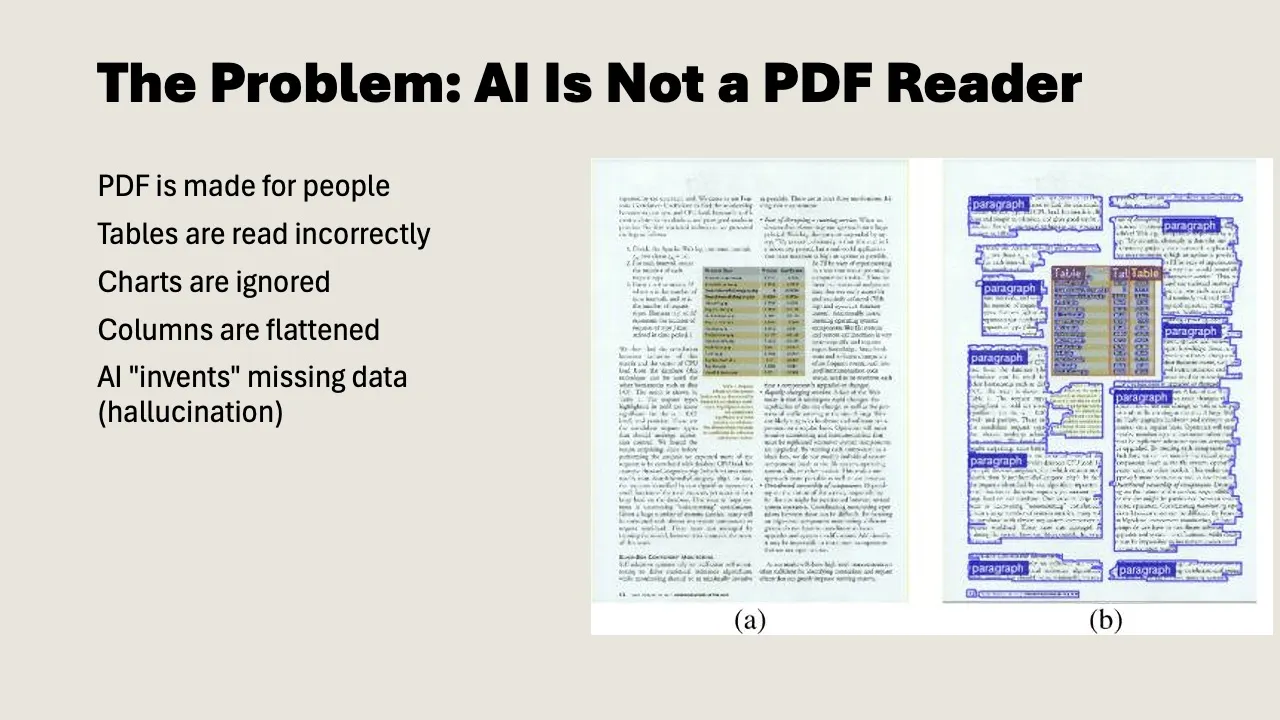
## PDF was made for eyes, not for language models
The PDF format dates back to the early 1990s. Adobe developed it so documents would look identical everywhere: first on paper, later on screen. The U.S. Internal Revenue Service was one of the first major users: forms that looked exactly the same for every recipient, without printing and mailing. Since then, PDF has become the standard for anyone who needs a reliable document: lawyers, governments, publishers, pension funds.
But under the hood, a PDF isn't text. It's a set of instructions for *drawing* text on a page: character coordinates, font choices, positions in pixels.
A language model doesn't read pixels. It reads text. To do anything with a PDF, the model first has to extract the text via OCR (optical character recognition). And that's where things go wrong.
## Where things go wrong in practice
### Tables
This is the biggest problem. A PDF table looks clear to us: rows, columns, numbers neatly aligned. But for a language model, those are loose text elements without structure. Columns bleed into each other, rows shift, a number that belongs to "Q3" gets linked to "Q2."
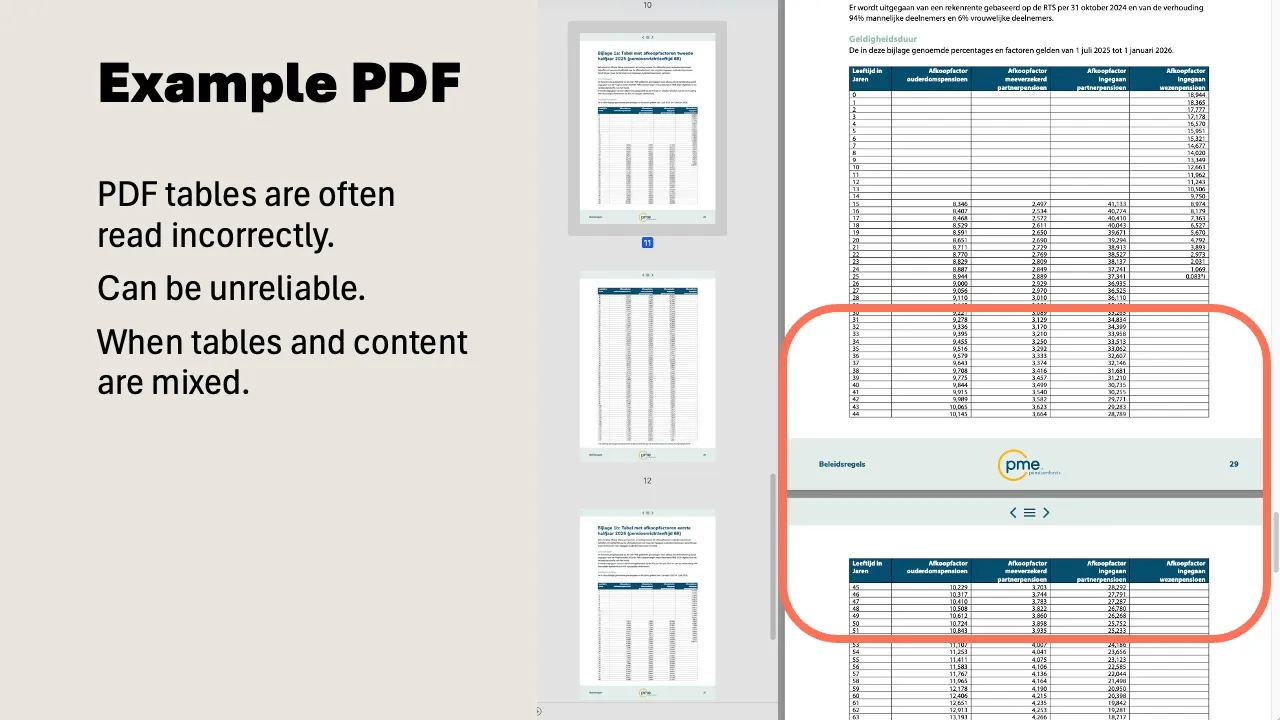
In a recent course, we showed a pension document with commutation figures by age group. Five columns, dozens of rows. Clear to us. The language model mixed up the columns and returned amounts that belonged to the wrong age group. Nobody catches that right away unless you double-check the numbers.
### Columns and layout
Many reports and academic papers use two columns. OCR reads left to right, combining text from the left and right columns into one unreadable mess.
The same problem shows up with page breaks. A table that continues from page 10 to page 11 is one unit to us. For the model, they're two separate fragments. The header disappears, the context breaks off.
### Visual elements
A bar chart in a PDF is clear to us at a glance. A language model can do little with it. It doesn't see the axes, reads the labels incorrectly, and misses the proportions. Org charts and flowcharts are even harder: the model sees loose text boxes but doesn't understand how they connect.
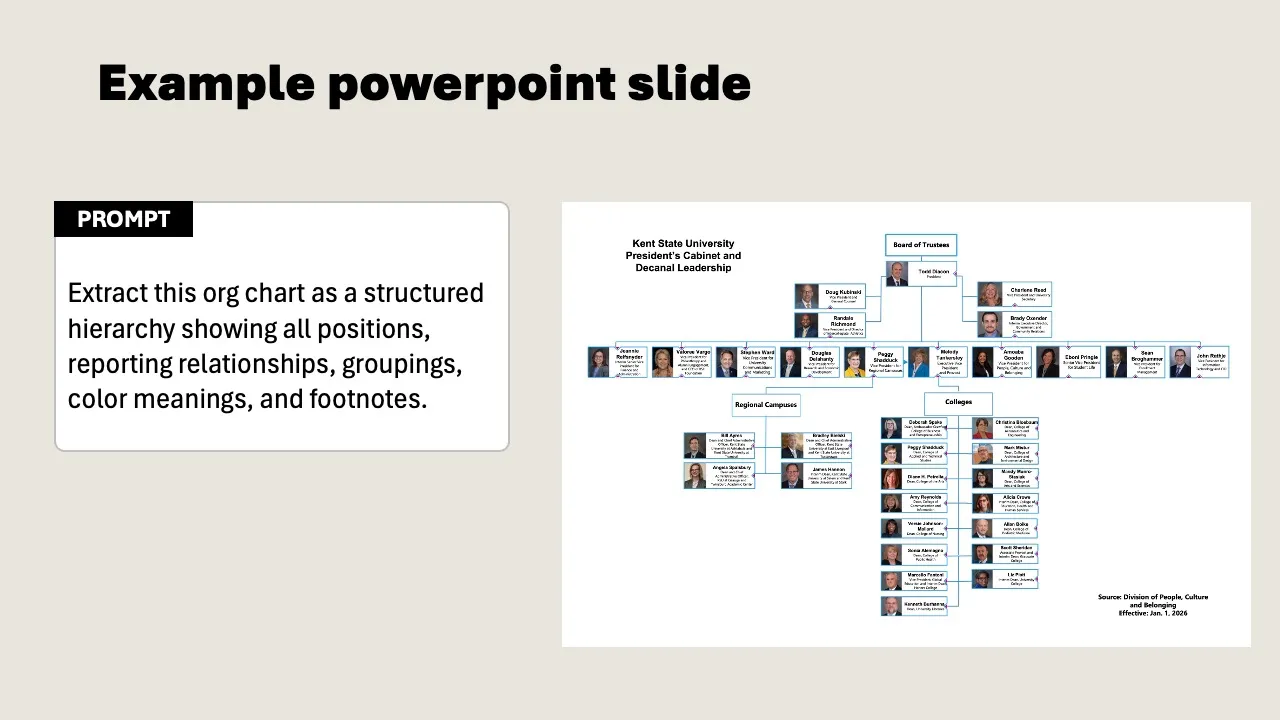
And then there are scans. Scanned documents with poor resolution, skewed text, or handwritten notes in the margins. The model does its best, but the error rate is high.
## Why this won't be solved anytime soon
You'd expect this to be a solved problem by now. Language models can write code, produce mathematical proofs, and translate across multiple languages. But reading PDFs? They still struggle with that.
The core problem goes deeper than bad OCR. OCR recognizes text but doesn't understand the *editorial structure* of a document. A heading, a footnote, a caption under a chart: the difference is obvious to us. For a model, they're pieces of text on a page, without hierarchy. For flowing prose, that works fine. But as soon as tables, forms, or multiple columns come into play, the structure falls apart.
Work is being done on this. A new generation of specialized models tackles PDFs in multiple steps: first segmenting the document into regions (headings, tables, images, footnotes), then sending each region to a separate model trained specifically on that type of element. The approach is comparable to how self-driving cars work: first segment the environment (car, pedestrian, road marking), then make decisions per object. Charts get converted to spreadsheets, handwritten notes get deciphered, and tables keep their columns.
Why are companies only now investing seriously in this? Because AI developers discovered that PDFs are an enormous, untapped source of high-quality data. Government reports, textbooks, scientific papers, patents: it's all in PDF. Researchers estimate that trillions of tokens of training data are locked up in PDFs. That makes the problem suddenly commercially interesting.
Results are getting better. But it's still a probabilistic system: the model *guesses* what the structure is. In 98% of cases, it gets it right. That last 2% is precisely the table with your quarterly figures, the form with handwritten notes, the scan that's slightly skewed. And then there are the edge cases nobody expects: PDFs that contain other PDFs, legal documents with passages that are sometimes underlined and sometimes struck through, faxes of medical forms that doctors have scribbled over.
PDF as a format isn't going away, either. Search interest rises steadily each year, without exception. There simply isn't another format that does what PDF does: a document that looks identical for every recipient, regardless of device, browser, or era. A PDF from 1995 opens today exactly as intended. Governments, lawyers, publishers, pension funds: they all depend on it. The volume of PDFs keeps growing. The problem isn't getting smaller.
## What you can do about it
The solution is simpler than you'd think. You don't have to wait for better models. You need to convert your core documents.
### Use the source file
Do you have the original Word document, the Google Sheet, or the Google Slides? Use that. Always. The source file contains the structure that a PDF loses. Only fall back on the PDF when you don't have a source file.
### Convert to plain text
Copy the content of your document to a Google Doc or a markdown file. Headings, subheadings, bullet points, tables in text format. No formatting, no logos, no page numbers. It's the content that matters.
For Google Docs: set the layout to "pageless" (File > Page setup). Without page breaks, it works as a continuous document, which is exactly what a language model needs.
### Let AI convert it
Have a slide deck of 50 pages? Upload it to Gemini and ask: "Convert this to structured text in markdown. Also describe what you see in visual elements." The model extracts the text and creates descriptions of charts and photos. You still need to review the result, but it saves hours of manual work.
### Handle tables separately
Tables are the most vulnerable part. Copy them from Excel or Sheets as plain text, or export as CSV. A table in CSV format is read flawlessly by a language model. The same table in a PDF is unpredictable.
### Work within the Microsoft ecosystem
Using Microsoft 365 with Copilot? Then you largely bypass the PDF problem. Copilot reads Word, Excel, and PowerPoint files directly via Microsoft Graph, including the original structure. No OCR, no guesswork. That's one of the reasons why working from source files is so much more reliable than working from a PDF export.
## When a PDF is perfectly fine
Not everything needs to be converted. PDFs work well enough for:
- Flowing text without tables (a policy document, a narrative report)
- Brainstorming and rough summaries (where exact numbers aren't critical)
- Documents you consult once (not as part of your permanent knowledge base)
The rule of thumb: if you wouldn't need to double-check the numbers in the answer, a PDF is fine. If amounts, percentages, or client names are involved, convert it.
## It takes an afternoon, it saves you months
Most teams we work with have 10 to 15 core documents: strategy plans, rates, campaign blueprints, target audience profiles. You convert those to plain text once. After that, you use them for everything you do with AI, for example as part of your [AI knowledge base](/knowledge-base/building-an-ai-knowledge-base/).
That conversion takes an afternoon. The alternative is crossing your fingers every time, hoping the model reads the PDF correctly. That's not a workflow. That's wishful thinking.
## AI Literacy: Why employees need to understand how AI works
> Without a basic understanding of AI, employees make avoidable mistakes. Learn about hallucinations, the VAK check, and when you can and can't trust AI.
**Author:** Casimir Morreau · **Date:** 2026-02-02
**URL:** https://copilot-academy.com/knowledge-base/ai-hallucinations-explained/
## The hyper-intelligent intern
Imagine this: you get a new intern. Brilliant, fast, and with an encyclopedic memory. But this intern has a quirk: they sometimes make things up. Not out of malice, but because they recognize patterns and draw conclusions that aren't there.
That's exactly how AI tools like Microsoft Copilot, ChatGPT, and Claude work. They're incredibly fast and impressively capable. But they have no understanding of what they're writing. They don't "know" whether something is correct.
For HR and L&D professionals, this is the starting point of any AI course. Because without this insight, two problems arise: employees who blindly trust AI, or employees who give up after one bad experience. Both cost your organization money.
This article explains what your team needs to understand about AI, and how to make that understanding measurable.
## How AI generates answers
### Predicting, not thinking
A language model like GPT-4 or Copilot works as a sophisticated prediction machine. It's trained on billions of texts and learns to recognize patterns. Word by word, it generates an answer by choosing the most probable next word each time.
Ask it: *"The capital of France is..."* and the model predicts "Paris" with 99% certainty. Not because it knows Paris is the capital, but because in the training data, "France" and "Paris" almost always appear together.
### No comprehension, no memory
This has three consequences your team needs to know:
1. **AI doesn't understand what it writes.** It recognizes patterns but has no concept of truth or meaning.
2. **Every answer is freshly generated.** Even the same question can produce a different answer, because AI is non-deterministic.
3. **AI doesn't know your organization.** It's trained on general text from the internet, not on your internal processes, clients, or organizational culture. You can address this with [context management](/knowledge-base/context-management-ai-workspace/).
For employees, this means: AI is a tool, not a reliable information source. Everyone on your team needs to understand that distinction.
## Hallucinations: the biggest risk
AI hallucinations are answers that sound convincing but are factually incorrect. The best models hallucinate in roughly 2% of responses. That sounds like a small number -- until you realize your team has dozens of AI interactions every day.
### The 4 types of hallucinations
**1. Factual inaccuracies**
AI presents statistics, dates, or events that are incorrect. An employee asks for market data and receives convincing percentages that are based on nothing.
> *Example: "The European AI market grew by 34.7% in 2025." This sounds precise enough to believe, but the figure is fabricated.*
**2. Fabricated details**
Names, products, or technical specifications that don't exist but sound plausible.
> *Example: an employee asks Copilot for a reference and gets "according to the research by Van der Berg & Willemsen (2024, Utrecht University)." The researchers and publication don't exist.*
**3. Logical errors**
Calculation mistakes or contradictory reasoning that make the conclusion unreliable.
> *Example: a financial overview where the subtotals don't add up to the total, yet the conclusion reads "within budget."*
**4. Fictitious sources**
Non-existent studies, articles, or experts cited as references.
> *Example: "Source: McKinsey Digital Workplace Report 2025, page 47." The report doesn't exist in that form.*
### Why hallucinations are dangerous in organizations
In an office environment, AI-generated text is often forwarded directly, dropped into presentations, or used as the basis for decisions. If no one checks, hallucinations spread as facts throughout the organization.
In our courses, we see that the majority of participants forward AI output without verification during the baseline assessment.
## The VAK check: three questions for every AI output
To catch hallucinations before they cause damage, we train employees in the **VAK check**. Three questions you ask before using any AI output:
### V: Verifiable
*Can I verify this information through a reliable source?*
Check facts, figures, and names. If AI cites a statistic, find the original source. If it mentions a name, check whether that person exists and whether the context is correct.
**Rule of thumb:** the more specific the detail (an exact percentage, a date, a name), the greater the chance of a hallucination.
### A: Accurate
*Do the calculations check out and is the reasoning logical?*
Verify that numbers add up, that conclusions follow from the premises, and that there aren't contradictions in the answer. AI is surprisingly poor at arithmetic and logical reasoning.
### K: Kloppend (Consistent)
*Does this align with what I know as a professional?*
This is the most important check. You're the subject matter expert, not the AI. If something doesn't feel right or diverges from what you know from experience, trust your own expertise.
**The VAK check in practice:**
| Situation | V | A | K | Action |
|-----------|---|---|---|--------|
| Copilot summarizes a meeting | Check attendee names | Check mentioned deadlines | Was I there? Does this match? | Review and send |
| AI drafts a client email | No facts to verify | Does the tone fit? | Does this suit the relationship? | Review tone and content |
| AI generates market figures | Look up the source! | Do the parts add up? | Realistic? | Verify or replace |
## When can you trust AI? The traffic light model
Not every AI task requires the same level of scrutiny. The traffic light model helps employees gauge how much checking is needed:
### Green: low risk
Tasks where errors have little impact and are easy to correct.
- Brainstorming and generating ideas
- Writing first drafts that you'll edit yourself
- Summarizing text you already know
- Internal communications without factual claims
**Level of scrutiny:** quick scan, check tone and style.
### Yellow: medium risk
Tasks where errors are noticeable but don't cause significant damage.
- Emails to clients or partners
- Presentations for internal use
- Meeting notes and action items
- Documents that will be read by others
**Level of scrutiny:** apply the VAK check, verify names and facts.
### Red: high risk
Tasks where errors have serious consequences.
- Legal documents or advice
- Financial reports with figures
- External publications on behalf of the organization
- Decisions based on AI-generated data
- Anything involving privacy-sensitive information
**Level of scrutiny:** full verification, have a second person review, check sources.
**For managers:** if your team consistently applies the traffic light model, you'll prevent the two most common AI incidents: forwarding incorrect information and sharing confidential data with AI tools.
## EU AI Act: what your organization needs to know
Since 2025, the EU AI Act sets requirements for how organizations use AI. For most office environments, the direct impact is limited: tools like Copilot fall into the "limited risk" category. But there are obligations your organization should be aware of:
- Employees and clients must know when they're dealing with AI-generated content (transparency)
- For important decisions, AI may advise, but a human makes the final call (human oversight)
- The AI Act reinforces existing GDPR obligations around the use of personal data (data and privacy)
AI literacy among employees is a first step toward compliance. People who understand what AI can and can't do make better choices about when and how to use it.
Most organizations we talk to don't yet have a formal AI policy. That's changing quickly now that the EU AI Act has taken effect.
## Observable behavior per level
As an HR or L&D professional, you don't just want to know *if* employees understand AI, but *how well*. The table below describes concrete, observable behavior at each level:
| | Starter | Basic | Proficient |
|---|---------|-------|------------|
| **Trust & verification** | Knows AI makes mistakes, checks occasionally | Applies the VAK check to important output | Predicts where AI will struggle, designs verification processes for the team |
| **Task selection** | Uses AI for simple, low-risk tasks | Consciously assesses which tasks are suitable (traffic light model) | Determines AI strategy per project type, advises colleagues |
| **Explanation & transfer** | Can say that AI "sometimes makes mistakes" | Can explain to colleagues *why* AI sometimes produces incorrect information | Leads workshops on AI literacy for team members |
| **Risk awareness** | Doesn't share sensitive data with public AI tools | Knows the difference between enterprise AI and public tools, follows guidelines | Contributes to the organization's AI policy |
**How to measure this:**
- Starter: intake assessment or initial self-scan
- Basic: after the [Copilot Fundamentals](/training/microsoft-copilot-fundamentals/) course (portfolio assignment: VAK check on a real work example)
- Proficient: after the [AI Workflow Training](/training/ai-workflow/) and certification
## Next step: from understanding to action
Understanding AI is the foundation. But understanding alone doesn't produce better output. The next step is learning to direct AI effectively, with structured instructions that consistently deliver usable results.
Read on: **[Effective Prompting: From vague instructions to usable results](/knowledge-base/effective-prompting-for-teams/)**
Or go back to the overview: **[The 3 AI skills your organization needs](/knowledge-base/three-essential-ai-skills/)**
## Context Management: How to teach AI to understand your organization
> AI knows nothing about your organization. With context documents and a structured AI workspace, you get output that's immediately usable.
**Author:** Casimir Morreau · **Date:** 2026-02-02
**URL:** https://copilot-academy.com/knowledge-base/context-management-ai-workspace/
## The context problem
Your employee opens Copilot and types: "Write a proposal for working from home." The result? A generic document about remote work, with references to legislation that doesn't apply. Unusable.
This is the context problem. AI tools are trained on billions of texts from the internet, but they know nothing about your organization. They don't know your clients, your internal processes, your brand guidelines, or your employment agreements. Every time an employee opens a new chat, AI starts with a blank slate.
The difference between a new hire and an experienced colleague? The experienced colleague knows the context. You can make that same leap with AI, if you give it the right information.
This is the third and perhaps most underestimated AI skill: **context management**. The ability to consistently provide AI with the information it needs to deliver output that fits your specific situation.
## What is a context document?
A context document is a file containing background information that you provide to AI. It's not a prompt; it's the *knowledge* behind the prompt.
Think of it as the difference between a briefing and an assignment. The assignment is: "Write a client email." The briefing is everything the writer needs to write that email well: who's the client, what's the relationship, what tone do we use, what's been discussed before.
### Types of context documents
**Organization context**: company profile (sector, size), brand guidelines and tone of voice, internal terminology and jargon.
**Team context**: team composition and roles, active projects, workflows and procedures.
**Personal context**: your role and responsibilities, recurring tasks, preferred communication style.
**Task-specific context**: client profiles, product information, policy documents, meeting notes and project documentation.
## The AI workspace: three folders
In our courses, we teach employees to set up a structured AI workspace. The principle is simple: three folders that organize your AI work.
```
AI-workspace/
├── Prompt library/ -> Tested, reusable prompts per task type
├── Context documents/ -> Organization, team, and personal context
└── Projects/ -> Active work, sources, and AI output
```
### Prompt library
This is where you store prompts you've tested and refined. Not one-off experiments, but reusable templates for recurring work. An employee who writes meeting notes weekly has one tested prompt that works every time, instead of improvising from scratch each week.
### Context documents
This is the heart of context management. You create a limited number of documents (usually 3 to 5) that you repeatedly send along or link to your AI tool. Set them up once properly and save time every week.
### Projects
This is where you store active work: sources you feed to AI, intermediate results, and final output. This prevents you from having to re-enter the same information every time.
**The result:** employees who work with an AI workspace spend less time repeating instructions and more time refining output.
Employees with an organized AI workspace save time consistently because they don't need to repeat instructions.
## From generic to organization-specific output
The difference that context makes is dramatic. Here's a real-world example:
### Without context
**Prompt:** "Write a proposal for hybrid work at our healthcare institution."
**Result:**
- Generic American document about "remote work"
- Standard office terminology, not relevant for healthcare
- References to outdated or non-existent legislation
- No consideration of 24/7 shifts or patient safety
### With context
**Prompt:** "Write a proposal for hybrid work for our healthcare institution."
**Context document provided:**
- Organization: regional healthcare institution, 1,200 employees, 3 locations
- Employment terms: Healthcare collective agreement with specific provisions on working hours
- Situation: 24/7 shifts, patient safety is the priority
- Audience: works council and executive board
- Perspective: HR advisor
**Result:**
- Specific to the Dutch healthcare sector
- Correct reference to healthcare agreement conditions
- Continuity of care as a guiding principle
- Practical implementation plan per location
- Written in language appropriate for the works council and executive board
Same model, same question, fundamentally different result. The only difference is the context.
## Reusable templates: the prompt + context formula
The real power of context management lies in reusability. Instead of typing all the information from scratch every time, you combine a fixed prompt with a context document.
### The formula
```
Starting prompt (TASK + ROLE + FORMAT) + Context document = Organization-specific output
```
### Example: weekly client update
**Starting prompt (saved in prompt library):**
> TASK: Write a concise client update for the account manager.
> ROLE: You are an experienced communications advisor in professional services.
> FORMAT: Max 200 words. Structure: progress (3 bullets), attention points (2 bullets), next step (1 sentence).
**Context document (saved in context documents):**
> Client: [Company name], sector: financial, contact person: [Name] (head of operations).
> Relationship: existing client since 2023. Tone: professional but personal, use first name.
> Active project: [Project name], phase: implementation, deadline: Q2 2026.
> Note: client values transparency about risks.
**Input (changes each week):**
> Last week: [paste relevant notes or action items here]
The starting prompt and context document stay the same. Only the input changes. Result: consistent, high-quality output in a fraction of the time.
Want to dive deeper into prompt structure? Read more about the four building blocks in our article on [effective prompting](/knowledge-base/effective-prompting-for-teams/).
## Why context management makes AI adoption scalable
The first two AI skills ([understanding AI](/knowledge-base/ai-hallucinations-explained/) and [effective prompting](/knowledge-base/effective-prompting-for-teams/)) are individual skills. Context management is the skill that makes AI adoption scalable across an organization.
### From individual to team
When one employee creates a good context document, the entire team can benefit. A brand guidelines document that everyone includes. A client profile the whole account team uses. Process descriptions that new employees can immediately feed to AI. Read how to scale this into a full [AI knowledge base](/knowledge-base/building-an-ai-knowledge-base/).
### From one-off to systematic
Without an AI workspace, every use of AI is an isolated experiment. With a workspace, AI becomes a consistent part of how people work. Employees don't have to reinvent the wheel every time.
### The ROI argument
The biggest time savings don't come from generating answers (AI does that in seconds). They come from *not having to rewrite* unusable output. Employees with good context spend less time correcting generic results and more time on work that actually matters.
Organizations with a structured AI approach consistently report spending less time rewriting unusable output.
Organizations that take context management seriously see a shift: from "AI doesn't work for us" to "AI understands how we work."
## Observable behavior per level
How do you recognize whether employees have mastered context management? The table below describes concrete behavior at each level:
| | Starter | Basic | Proficient |
|---|---------|-------|------------|
| **Context usage** | Provides minimal or no context to AI | Sends relevant context documents for complex tasks | Manages project-wide context, keeps documents up to date |
| **AI workspace** | Saves output sporadically, no fixed structure | Has a working folder structure (3 folders) on their own system | Maintains a shared AI workspace for the team |
| **Reusability** | Starts every AI interaction from scratch | Has at least 1 reusable context document, combines it with fixed prompts | Builds and maintains templates that colleagues can use |
| **Efficiency** | Spends significant time correcting generic output | Gets usable output on the first try through good context | Experiences noticeable time savings, can quantify this |
**How to measure this:**
- Starter: intake assessment, employee describes how they currently use AI
- Basic: after the [Copilot Fundamentals](/training/microsoft-copilot-fundamentals/) course (portfolio assignment: working AI workspace with at least 1 context document)
- Proficient: after the [AI Workflow Training](/training/ai-workflow/) and certification
## Next step: the complete framework
You've now explored the three AI skills: [understanding AI](/knowledge-base/ai-hallucinations-explained/), [effective prompting](/knowledge-base/effective-prompting-for-teams/), and context management. Together, they form the framework for teaching your employees to work with AI in a structured, sustainable way.
Go back to the overview for the complete picture: **[The 3 AI skills your organization needs](/knowledge-base/three-essential-ai-skills/)**
## Effective Prompting: From Vague Instructions to Usable Results
> Why 'bad prompts' aren't laziness but a communication problem. Learn the building blocks, iteration techniques, and observable behavior per skill level.
**Author:** Robert Vos · **Date:** 2026-02-02
**URL:** https://copilot-academy.com/knowledge-base/effective-prompting-for-teams/
## Why "bad prompts" aren't laziness
An employee types into Copilot: "Summarize this report." The result is generic, too long, and misses the point. The employee concludes: "AI doesn't work." Sound familiar?
The problem isn't laziness or lack of talent. The problem is that prompting is a **communication skill** that nobody's been taught. We expect employees to communicate effectively with a tool they don't understand, in a format they've never used before.
Imagine giving a new colleague an assignment. "Write a summary" is too vague. That colleague would ask: of which report? For whom? How long? Which parts matter? AI doesn't ask those questions. It guesses, and delivers generic output.
The solution isn't a prompt collection that employees copy and paste. The solution is teaching employees *how* to communicate with AI. That's a skill you can learn and improve.
## The 4 building blocks of an effective prompt
In our courses, we use the **TASK/CONTEXT/ROLE/FORMAT framework** (TCRF). Four building blocks that together form a clear instruction:
### 1. TASK: What should AI do?
Start with a verb. Be specific about the end result.
- **Vague:** "Write something about the project"
- **Specific:** "Write a progress report of no more than 300 words for the management team on Project Atlas"
### 2. CONTEXT: What background information is relevant?
AI knows nothing about your situation. Provide the information a colleague would also need.
- **Without context:** "Write an email to a client"
- **With context:** "Write an email to Marieke de Vries (HR manager at BNG Bank). Last week we ran a pilot with 15 participants, score 4.8/5. Goal: schedule a follow-up."
### 3. ROLE: What perspective should AI take?
By assigning a role, you steer the tone, level of detail, and expertise of the output.
- **Without role:** "Give feedback on this report"
- **With role:** "You are a senior editor with experience in business communication. Give feedback on clarity, structure, and persuasiveness."
### 4. FORMAT: What should the result look like?
Specify the format you expect. This saves you from having to reformat after generation.
- **Without format:** "Give tips for the meeting"
- **With format:** "Give 5 tips as a numbered list. Per tip: a title in 3 to 5 words, followed by an explanation in 1 sentence."
The detailed explanation per building block with more examples can be found in our [Copilot Fundamentals](/training/microsoft-copilot-fundamentals/) course.
## Two examples from HR/L&D practice
### Example 1: Writing a course proposal
**Weak prompt:**
> Write a proposal for an AI training course.
**Result:** a generic document that doesn't fit the organization, with no budget, no target audience, no measurable goals.
**Strong prompt:**
> **TASK:** Write a 1-page proposal for an AI skills course for our HR department (12 employees).
>
> **CONTEXT:** We've had Microsoft 365 with Copilot licenses for 3 months. Adoption is low: 4 out of 12 actively use Copilot. Management wants the entire team at baseline level by Q2. Budget: EUR 5,000.
>
> **ROLE:** You are an L&D consultant with experience in digital transformation at mid-sized organizations.
>
> **FORMAT:** Structure: rationale (3 sentences), objective (SMART), approach (3 steps), investment, expected outcome. Tone: professional, persuasive for the management team.
**Result:** a targeted proposal ready for management, with concrete figures and an implementation plan.
### Example 2: Designing an evaluation form
**Weak prompt:**
> Create an evaluation form for a course.
**Result:** a standard smiley form with questions like "How satisfied are you?" Not very useful for improvement.
**Strong prompt:**
> **TASK:** Design an evaluation form that measures both satisfaction and learning impact after an AI skills course.
>
> **CONTEXT:** Participants are knowledge workers (bachelor's degree and above), the course is 1 day, focused on prompting and setting up an AI workspace. We want to measure whether participants apply the skills in practice.
>
> **ROLE:** You are a learning consultant specialized in Kirkpatrick's evaluation model.
>
> **FORMAT:** 10 questions: 4 on reaction (5-point scale), 3 on learning (open + closed), 3 on behavioral intent. End with 1 open question. Conversational tone.
**Result:** a professional form that distinguishes between satisfaction and actual learning impact.
## The conversation after the first prompt
A common mistake: giving up after the first result, or accepting it without adjustments. Effective prompting is iterative. You work in a back-and-forth with AI.
### How iteration works
1. **Send your initial prompt** (with the 4 building blocks)
2. **Evaluate the result**: what's good, what's missing?
3. **Give targeted feedback**: not "make it better" but specifically what you want changed
4. **Repeat** until the result is usable
### Feedback that works
| Instead of... | Say... |
|---------------|--------|
| "This isn't good" | "The tone is too formal for this audience. Make it more personal, use 'you' instead of formal language." |
| "Make it better" | "Add concrete examples to points 2 and 4. Make the conclusion 50% shorter." |
| "Try again" | "Rewrite the introduction from the manager's perspective, not the employee's." |
### When to start over?
Sometimes iterating isn't enough. Start a new conversation when:
- The direction is fundamentally wrong (AI interpreted the task differently)
- You want to change your approach midway
- The conversation gets too long and AI [loses context](/knowledge-base/context-management-ai-workspace/)
**Rule of thumb:** 2 to 3 iterations is normal. After 5 iterations without improvement: reformulate your initial prompt or start over.
## Breaking down complex tasks
AI performs better on focused tasks than on broad assignments. A mega-prompt of 500 words asking for 10 things at once almost always produces mediocre results.
### The 3-step method
**Step 1: Let AI determine the structure**
> "I want to write an onboarding program for new employees. What sections should this program contain? Give me a table of contents."
**Step 2: Work through each section**
> "Develop section 3, 'First Work Week.' Context: [specific information]. Format: daily schedule with activities and responsible persons."
**Step 3: Combine and refine**
> "Here are the completed sections [paste them together]. Smooth out the transitions, remove overlap, and ensure the tone is consistent."
You get better results and more control over the final product.
## What managers should look for
As a manager or L&D professional, you don't need to read every prompt. But you can spot whether employees are developing the skill:
**Signs of growth:**
- Employee spends slightly more time on the prompt but gets usable results faster
- Output requires less manual adjustment
- Employee can explain *why* a prompt worked well or poorly
- Employee shares working prompts with colleagues
**Signs of stagnation:**
- Employee keeps typing short, vague instructions
- Output is routinely rewritten entirely
- Employee says "AI doesn't work for my job"
- No saved prompts, starting from scratch every time
## Observable behavior per level
| | Starter | Basic | Proficient |
|---|---------|-------|------------|
| **Prompt quality** | Writes simple, short instructions | Uses all 4 building blocks (TCRF) in initial prompts | Creates reusable prompt templates for recurring tasks |
| **Iteration** | Accepts first output or gives up | Refines output with at least 2 targeted follow-ups | Solves output problems methodically, knows when to start over |
| **Workflow** | Types prompts directly into the chat interface | Drafts initial prompts externally (in a document) before entering them | Maintains a prompt library, optimizes prompts for specific use cases |
| **Knowledge sharing** | Uses AI individually, doesn't share approach | Saves working prompts for personal reuse | Shares prompts and best practices with the team |
**How to measure this:**
- Starter: intake assessment or initial observation
- Basic: after the [Copilot Fundamentals](/training/microsoft-copilot-fundamentals/) course (portfolio assignment: a developed initial prompt using all 4 building blocks, tested and refined)
- Proficient: after the [AI Workflow Training](/training/ai-workflow/) and certification
## The pitfall of prompt collections
One final warning. It's tempting to hand employees a list of "the best prompts" and call it a day. That doesn't work.
Prompt collections are useful as reference material, but they don't replace the skill. A copied prompt works as long as the situation matches exactly. The moment the context changes (different client, different document, different tone), the employee needs to be able to *adapt* the prompt. That requires understanding the building blocks, not copying examples.
You can give someone a recipe, and it'll work. But a cook who understands the principles (why you bake something, what flavor balance means) can improvise when an ingredient is missing. That's the difference between a prompt collection and prompting proficiency.
So invest in the skill, not just the collection.
## Next step: from prompt to context
You now know how to give effective instructions to AI. But the quality of your output isn't determined by your prompt alone. It's determined by the *information* AI has at its disposal.
Read on: [Context Management: How to teach AI to understand your organization](/knowledge-base/context-management-ai-workspace/)
Or go back to the overview: [The 3 AI Skills Your Organization Needs](/knowledge-base/three-essential-ai-skills/)
## The 3 AI Skills Your Organization Needs
> Why AI licenses without skills don't work. Discover the three skills (AI literacy, effective prompting, and context management) and how to measure them.
**Author:** Robert Vos · **Date:** 2026-01-10
**URL:** https://copilot-academy.com/knowledge-base/three-essential-ai-skills/
## Why "just try it out" doesn't work
Your organization has invested in AI licenses. Microsoft 365 Copilot has been rolled out, the technology is ready to go. But three months in, the reality sets in: some team members use it daily, while a larger group stopped after two weeks.
We see this pattern at virtually every organization we work with. The problem isn't the technology. The problem is the assumption that employees will figure out how to work with AI on their own.
At organizations without structured training, we see the majority of employees either stop using AI or limit it to basic tasks within three months.
### The disappointment cycle
It almost always plays out the same way:
1. Licenses are distributed, employees give it a try
2. The output is generic, unusable, sometimes outright wrong
3. "AI doesn't work for my job," the license goes unused
4. Management sees no return on the investment
The solution isn't more licenses, better tools, or stricter adoption KPIs. The solution is **skills**. Employees who know how to work with AI get consistent value from it. Those who don't, drop off.
## Three skills, not three tools
At Copilot Academy, we train employees in three core skills. Not three tools, not three features, but three skills that work with any AI tool, whether it's Copilot, ChatGPT, or Claude.
The metaphor we use: think of AI as a **hyper-intelligent intern**. Enormously capable, fast, with access to an encyclopedic amount of knowledge. But: no experience with your organization, no sense of what matters, and every now and then an answer that looks right but isn't.
To work effectively with this intern, you need three things:
1. **Understand what the intern can and can't do** -> AI Literacy
2. **Give clear instructions** -> Effective Prompting
3. **Give the intern the right background information** -> Context Management
These three skills build on each other. You can't prompt well without understanding AI. And your prompts only become truly effective when you add context. That's why we cover them in this order.
## Skill 1: AI Literacy
The first skill is understanding how AI works. Not at a technical level, but functionally. Employees who understand this know when they can trust AI and when they need to double-check.
This includes:
- How language models generate responses (prediction, not comprehension)
- Why AI hallucinates and how to recognize it
- The VAK check: three questions for every AI output
- The traffic light model: when to scan quickly, when to verify thoroughly
Without AI literacy, two risks emerge: employees who blindly accept everything, or employees who reject AI entirely after a single bad experience. Both are costly.
**Read the full article:** [AI Literacy: Why employees need to understand how AI works](/knowledge-base/ai-hallucinations-explained/)
## Skill 2: Effective Prompting
The second skill is giving structured instructions. The difference between a vague request and a usable result almost always comes down to prompt quality.
This includes:
- The 4 building blocks: Task, Context, Role, Format (the TCRF framework)
- Iterative work: the conversation after the first prompt
- Breaking complex tasks into focused steps
- The pitfall of prompt collections (understanding > copying)
Prompting isn't a technical skill; it's a communication skill. And like any communication skill, you can learn it, practice it, and get better at it.
**Read the full article:** [Effective Prompting: From vague instructions to usable results](/knowledge-base/effective-prompting-for-teams/)
## Skill 3: Context Management
The third skill, and the most underestimated, is context management. AI knows nothing about your organization, your clients, or your processes. Every chat starts with a blank slate.
This includes:
- What context documents are and how to create them
- The AI workspace: three folders that structure your AI work
- From generic to organization-specific output
- Reusable templates: prompt + context = consistent results
Context management is the skill that makes AI adoption scalable. One good context document can serve the entire team. That's the difference between individual experimentation and organization-wide adoption.
**Read the full article:** [Context Management: How to teach AI to understand your organization](/knowledge-base/context-management-ai-workspace/)
## How to measure AI skills
As an HR or L&D professional, you don't just want to know *if* employees are working with AI, but *how well*. We work with three levels that correspond to observable behavior in the workplace:
### Overview per level
| Skill | Starter | Basic | Proficient |
|-------|---------|-------|------------|
| **AI Literacy** | Knows AI makes mistakes, checks occasionally | Applies the VAK check, assesses tasks consciously | Predicts AI limitations, designs verification processes |
| **Effective Prompting** | Writes short, vague instructions | Uses all 4 TCRF building blocks, iterates | Creates reusable templates, shares with team |
| **Context Management** | Provides minimal context, no structure | Has an AI workspace with context documents | Manages team context, experiences measurable time savings |
### What each level means
**Starter**: experiments with AI ad hoc
> "I can use AI for simple tasks like summarizing and drafting, while checking the output."
**Basic**: applies AI in a structured way to their own work
> "I write structured prompts, check output systematically, and work with an organized AI workspace."
**Proficient**: designs reusable AI workflows
> "I design AI workflows for myself and my team. I know where AI does and doesn't work, and I can transfer my approach to others."
### How to measure
For each skill, we describe **observable behavior**: concrete and testable. Not abstract competencies, but things you can actually see in the workplace:
- Does the employee verify facts before sending AI output?
- Does the employee draft prompts externally in a document?
- Does the employee have a working AI workspace with context documents?
The detailed behavior tables can be found in each of the three in-depth articles.
## From insight to implementation
You now know which three skills make the difference. The question is: how do you bring them to your team?
### Our approach
At Copilot Academy, we work with a structured program that builds the three skills in a logical sequence:
1. Build AI literacy: understand the capabilities and limitations
2. Develop prompting skills: learn to communicate with AI
3. Set up the AI workspace: make AI a consistent part of how people work
Each step builds on the previous one. And each step delivers measurable results: from observable behavior to concrete time savings.
After completing the full program, we see participants continue to use AI consistently and apply the skills they learned in their daily work.
Want to know what this could look like for your organization? Check out the [AI Skills Program](/ai-skills-programma/) or [schedule a conversation](/contact/) with one of our trainers.
## Copilot Excel & Data Training
> Learn to use AI for data analysis and Excel work, from generating formulas to analyzing datasets and creating visualizations.
**Price:** €2.450 per group · **Duration:** 3 hours · **Format:** blended
**URL:** https://copilot-academy.com/training/copilot-excel-ai-training/
## AI for data analysis and Excel work
Excel is still the workhorse for many professionals. But building complex formulas, cleaning datasets, and compiling reports eats up hours. With AI you can automate the routine work and focus on the analysis itself.
### Where AI makes the difference in Excel
In this course you'll learn to use AI for the tasks that currently take you the most time:
- **Generating formulas**: describe what you want to calculate in plain language and let AI build the formula. From nested IF statements to complex VLOOKUP combinations.
- **Cleaning data**: inconsistent formatting, missing values, duplicates. AI helps you whip a dataset into shape in minutes instead of hours.
- **Running analyses**: setting up pivot tables, spotting trends, flagging outliers. You'll learn to ask AI the right questions about your data.
- **Creating visualizations**: from raw numbers to clear charts. AI picks the right chart type and formats the result.
### Copilot in Excel vs. ChatGPT
Both tools are useful for data work, but in different ways. Copilot works directly inside your spreadsheet — it can insert formulas, add columns, and generate charts without leaving Excel. ChatGPT is stronger at explaining complex formulas, writing VBA macros, and analyzing data you paste in as text.
In this course you'll learn when to reach for which tool and how to combine them for the best result.
### How the course works
We work with your own data as much as possible (anonymized where needed). You'll go through four exercises: cleaning a dataset, running an analysis, generating a report, and optimizing an existing spreadsheet. Each exercise builds on templates you can reuse right away.
### What you walk away with
You'll receive a **formula library** with the most commonly used AI-generated formulas by category (finance, HR, operations) and **analysis templates** you can use as a starting point for your own projects.
Want to learn more about [writing effective prompts for structured work](/knowledge-base/effective-prompting-for-teams/)? The TCRF framework we describe in that article applies to data work too.
---
# Knowledge Base
## How to Copy a Webpage as Plain Text (for AI)
> Cookie banners, menus, chat widgets, ads. Copy-pasting a regular webpage into AI usually gives you junk. Two ways to get clean text instead.
**Author:** Casimir Morreau · **Date:** 2026-05-12
**URL:** https://copilot-academy.com/knowledge-base/copy-webpage-as-plain-text-for-ai/
## The problem: a webpage isn't really text
You copy a page from a company website, paste it into Copilot, and ask for a summary. The answer starts with "Skip to main content" and ends with the cookie policy. Half of what you pasted was navigation, footer, chat widget, and ad copy.
A language model doesn't see a page. It sees a wall of text with no distinction between content and interface. The less noise you feed in, the better the answer. Here are two ways to extract just the content.
## Option 1: Immersive Reader in Microsoft Edge
Edge has a button that strips a page down to its readable content. No menus, no banners, no ads. Just the text.
1. Open the page in Edge
2. Click the book icon in the address bar (or press F9)
3. Choose "Immersive reader"
4. Select all (Cmd+A or Ctrl+A), copy, paste into your AI

What you get back is the page without formatting or interface elements. Works on most news pages, knowledge bases, and articles. On heavy web apps (dashboards, forms) the button sometimes doesn't appear, because there's no clear "reading content" for Edge to extract.
## Option 2: defuddle.md in front of the URL
Sometimes you don't want to click buttons, and sometimes you're not using Edge. There's a trick that works in any browser: put `https://defuddle.md/` in front of the URL.
So instead of:
```
https://www.bngbank.nl/en/about-bng
```
You go to:
```
https://defuddle.md/https://www.bngbank.nl/en/about-bng
```

What comes back is markdown: the text with headings, lists, and links intact, without the rest of the page. At the top you get useful metadata (title, source, language, word count) that you can copy along into your AI.
Two alternatives that do the same thing:
- `https://markdown.new/[url]`
- `https://r.jina.ai/[url]`
Which one you pick is taste. Defuddle gives slightly cleaner output, Jina sometimes handles JavaScript-heavy pages better.
## When to use which
| Situation | Method |
|-----------|--------|
| One page, quick summary | Immersive Reader |
| Behind a login or paywall | Immersive Reader (you're already signed in) |
| No Edge at hand | defuddle.md in front of the URL |
| Page needs JavaScript to load | r.jina.ai in front of the URL |
| You want to save the text as markdown | defuddle.md (save the file) |
## Why this matters
A lot of teams paste pages straight into Copilot or ChatGPT and then wonder why the answer is messy. The input is messy. A language model doesn't distinguish between "the article" and "the button in the navigation" unless you draw that line for it.
This is part of [context management](/knowledge-base/context-management-ai-workspace/): the content you give AI shapes the answer as much as the question you ask. Clean input, better result.
The same reason you [convert PDFs to plain text](/knowledge-base/why-pdfs-dont-work-with-ai/) before handing them to AI applies to webpages. It takes ten seconds. It saves you an unusable answer.
## Building Your AI Knowledge Base: From Scattered Documents to a Working Memory
> AI knows nothing about your organization. A knowledge base changes that. But most documents aren't AI-ready. Here's how to fix them.
**Author:** Casimir Morreau · **Date:** 2026-03-04
**URL:** https://copilot-academy.com/knowledge-base/building-an-ai-knowledge-base/
## AI has no memory of your organization
A language model has read billions of texts. It knows what customer data is, how marketing campaigns work, and roughly what a good strategy looks like. But it knows nothing about *your* customer data, *your* campaigns, or *your* strategy.
Every time you open a new chat, the model starts with a blank slate. It doesn't know your internal jargon. It doesn't know that client X gets a special discount, that your marketing team distinguishes between brand A and brand B, or that your survey results from last quarter revealed a shift in audience behavior.
That's the fundamental problem. And the solution isn't writing better prompts. The solution is a **knowledge base**: a structured collection of documents that provides the language model with everything it's missing.
## What exactly is an AI knowledge base?
The definition is short: **all the information a language model needs but doesn't have.**
That sounds broad, and it is. In practice, it includes things like: who you are and which brands you run. Objectives, KPIs, target audience profiles. Campaign results and A/B test outcomes. How you set up a campaign, which steps you always follow. Price lists, customer profiles, discount agreements. And perhaps the most valuable: the lessons from one campaign that you want to carry into the next.
This isn't a database dump. It's the knowledge your team carries in their heads but never writes down. Every organization has this: implicit agreements, unwritten rules, nuances you pick up after three months on the job. You need to make that knowledge explicit, because a language model won't pick it up on its own.
## Why your documents aren't AI-ready
Here's where most teams hit a wall. You have mountains of information: strategy decks in Google Slides, campaign reports as PDFs, rates in Excel, project plans in PowerPoint. The problem: those formats were made for people, not for AI.
### PDF: unreliable for structured data
A [PDF looks clear and organized to us](/knowledge-base/why-pdfs-dont-work-with-ai/). Nicely formatted, tables neatly aligned, logo in the corner. But for a language model, a PDF is a disaster. Tables shift, columns bleed into each other, numbers jump across pages. The model hallucinates numbers it can't read properly. Prices, percentages, customer IDs: exactly the data that matters.
### Plain text: a world of difference
Convert that same document to plain text with headings and structure (markdown or a Google Doc), and accuracy goes up dramatically.
Why? Language models are trained on text. They understand headings, bullet points, and tables in text format. They don't have to guess where one column ends and the next begins. It's the content that counts, not the formatting.
### The practical approach
You don't need to convert everything. Focus on your **core documents**: the 10 to 15 files you use most often. Your brand strategy, your campaign blueprint, your rates, your target audience profile. Make those AI-ready. The rest you can attach as needed.
There are several ways to convert. Have Google Slides? Let Gemini read them and convert to structured text. The model extracts the text and also describes what it sees in visual elements (charts, diagrams, photos). Have a PDF? Upload it and ask for conversion to "raw markdown." But better yet: use the original source file (the Word document, the Google Sheet) and work from there. Export Excel and Sheets to CSV or copy as text. Tables in plain text work just fine.
**Tip**: set Google Docs to "pageless" mode (File > Page setup). You don't need page breaks. It's about the text, not how it looks on paper.
## Two types of documents you need
In practice, you'll quickly notice you're building two different types of documents. They're often confused, but the distinction matters.
### 1. Context documents
A [context document](/knowledge-base/context-management-ai-workspace/) describes the *content*: who you are, what you do, how you work. It's the knowledge itself.
Examples:
- "This is brand X. The target audience is Y. The strategy for 2026 focuses on Z. Our KPIs are..."
- "This is our campaign team. Colleague A handles social, colleague B handles print. Our planning runs quarterly."
- "Client A gets a 20% discount. This was decided in Q3 2025 by [name], reason: multi-year contract."
That last point is important. Many organizations document *what* they decided, but not *why*. That discount lives somewhere in a spreadsheet, but the reasoning is nowhere to be found. The language model then assumes all clients get a 20% discount. That's exactly the kind of mistake you want to prevent.
### 2. Navigation documents
A navigation document describes the *structure*: what lives where, how the knowledge base is organized, and which document wins when there are contradictions.
This is what Claude calls a `CLAUDE.md` file, and Gemini serves a similar function. It tells the model: "In folder 1 you'll find customer data. In folder 2 you'll find rates. The document `rates-2026.md` is the single source of truth for pricing."
**Single source of truth** is a concept you'll find yourself using a lot. If three places in your knowledge base say something different about course duration (twice three hours, three times two hours, twice 2.5 hours), you need to specify somewhere which document holds the truth. Otherwise the model picks at random and you get inconsistent output.
## You stay in the driver's seat
There's a lot of hype about AI agents that work completely on their own. Answering emails, setting up campaigns, running analyses. In practice, it works differently.
The approach that actually works is somewhere in the middle: **you stay in the loop**. The model does the prep work: searching your knowledge base, retrieving relevant documents, drafting a first version. But you evaluate the result and decide what happens next.
That's called "agentic" work. You give the model a task, it works independently (searches documents, creates sub-chats, compares sources), and comes back with a proposal. You say yes, no, or adjust this. The model continues. That's how you collaborate.
This is also where the nuance lies. A language model can produce a campaign analysis, but it can't judge whether that analysis holds up in your specific context. It can write a proposal, but it doesn't know whether the tone fits that one client who always prefers more formal communication. That judgment stays with you.
And that's not a shortcoming. That's how knowledge work actually operates. In software, AI can build, test, find bugs, and try again. In consumer insights or campaign strategy, the value lies in human judgment. Your job changes, but it doesn't disappear.
## How to get started: four steps
### Step 1: Inventory your core documents
Which 10 to 15 documents do you use most often? Think: brand strategy, campaign blueprint, target audience profile, rates, lessons from last quarter, team role assignments.
### Step 2: Create a context document
Start with one document that describes who you are and what you do. Use it as a starting point for every AI interaction. You can write this manually, or have the model interview you: paste your strategy slides in and ask for a structured context document based on them.
Important: then go through it carefully. The model creates a solid first draft, but if there's an error in your base document, it'll propagate into everything you do with it. Have the people who own the knowledge review the document.
### Step 3: Convert core documents to plain text
Take your strategy deck, your campaign report, your rates. Convert them from PDF or Slides to structured text. Headings, subheadings, bullet points. No formatting, no logos, no page numbers. It's the content that counts.
### Step 4: Organize and label
Create a folder structure. Give each folder a name that describes its contents. Write a navigation document that explains how the knowledge base is organized. For each topic, designate which document is the single source of truth.
## Common mistakes
Most teams start too big. They want to convert everything at once. Don't. Start with one context document and five core documents. Build out over time.
A second classic mistake: uploading PDFs and hoping for the best. They do work, but not reliably enough for tasks where accuracy matters. Convert your core documents.
Teams also tend to forget the nuance. The model reads what you give it. If nothing explains why a decision was made, the model won't know either. Document the *what* and the *why*.
Set every context document to read-only, except for the owner. If everyone can edit, reliability disappears.
And finally: clean up contradictions. If two places say different things about course duration or rates, the model will trip up. Designate a single source of truth.
## This isn't automation
It's tempting to see a knowledge base as a step toward automation. It isn't. A knowledge base is a source of truth. How you work changes (faster, broader, with better first drafts), but what you do and why you do it remain the same.
Your responsibility shifts from figuring everything out yourself to evaluating and steering what the model produces. Your reach grows. You can do more. But it's still your expertise that determines whether the output is right.
The investment isn't in the tool. You probably have that already. The investment is in writing down what your team knows. That takes time, and it's not the most glamorous work. But every hour you put in, you'll earn back double on every project you tackle with AI going forward.
## Why AI Always Agrees With You (And How to Use That)
> AI is trained to be helpful, not honest. That makes it a yes-man. But once you understand how it works, you can use it to your advantage.
**Author:** Casimir Morreau · **Date:** 2026-03-04
**URL:** https://copilot-academy.com/knowledge-base/why-ai-always-agrees/
## The yes-man on your desk
Imagine this: two people are having an argument. Both ask ChatGPT to analyze the situation. To the first, the model says: you're right. To the second: you're right. Not because it's lying, but because it's built to be helpful to whoever is asking.
That's sycophancy. The word sounds academic, but the behavior is instantly recognizable. AI wants to help you. It wants you to be satisfied with the answer. So it follows the direction you've already signaled in your question.
For a brainstorm, that's fine. For a risk analysis, an investment opinion, or a policy assessment, it's a problem.
## How you steer AI without realizing it
Most of this steering happens unconsciously, in your word choice. A few examples.
*"Would it be a good idea to..."* You've already said "good." The model picks up on that and confirms. You get a nuanced "yes" back, with arguments supporting your direction.
*"Can you confirm that..."* You're asking for confirmation. The model provides confirmation.
*"I think we should..."* You've already expressed a preference. The model follows.
In a recent course at a pension fund, a participant asked whether he could have AI write investment opinions. The answer is yes, but with a caveat: if you ask the model for a "slightly positive" analysis, you get a slightly positive analysis. Ask for a "slightly negative" one, and you get that instead. The model mirrors your framing.
That's not a bug. That's how it was built. Language models are trained on billions of conversations where helpfulness was rewarded. The pattern they learned: give the user what they want to hear.
## Every model has a personality
There's another layer on top of this. Every AI model has a system instruction that shapes how it behaves. And those instructions aren't neutral.
ChatGPT is trained to be personal, coaching, encouraging. It gives you compliments. "What a great idea, Joyce!" "You've got a sharp eye for this!" That makes it pleasant to work with, but you get less pushback.
Copilot has a more businesslike system instruction. It's less friendly, gives fewer compliments, writes more matter-of-factly. For communication tasks, many people find it sounds a bit flat. For analytical work, that directness is actually an advantage.
Claude sits somewhere in between: less complimentary than ChatGPT, but with more tendency to surface nuances and counterarguments.
The point: "neutral" doesn't exist in AI. Every model has a tone and a tendency. If you know that, you can correct for it. If you don't, you take the output at face value.
## A different answer every time
Here's something else that surprises people. Ask the same question twice and you get two different answers. Not because the model is uncertain, but because it works with probability. It picks the most likely next word, but when the probabilities are close, it makes a random choice.
Ask "the best pet is a..." and you'll get "dog" one time, "cat" the next, sometimes "rabbit." Ask "the capital of France is..." and you get "Paris" 99.99% of the time, because there's no ambiguity in the training data.
For factual questions, this doesn't matter much. But for subjective tasks (a summary, an opinion, an analysis), you get a slightly different version each time. Just like when you ask two colleagues to summarize the same meeting.
Many people find this frustrating. But it's actually a strength. You can ask the same question three times and pick the best version. Or ask the model: which of these three answers is strongest?
## How to use sycophancy to your advantage
Once you understand that AI follows your lead, you can use that intentionally. Instead of asking one question and accepting the answer, you pose the same question from multiple perspectives.
### Switch perspectives
Ask the same question from multiple roles:
> Analyze this investment proposal from the perspective of a risk-averse pension fund.
> Analyze the same proposal from the perspective of an aggressive hedge fund manager.
> What risks would a regulator see in this proposal?
Three perspectives, three analyses. Together they'll give you a more complete picture than any single "neutral" answer ever could.
### Ask for pushback
> I think we should move forward with this project. Give me 5 reasons why that would be a bad idea.
By explicitly asking for counterarguments, you break through the tendency to agree. The model can produce strong counterarguments, but it'll only do so when you ask.
### Assign a critical role
> You are a critical reviewer who looks for weak points in arguments. Critique this proposal. Be harsh.
By [assigning a role](/knowledge-base/effective-prompting-for-teams/) that is explicitly critical, you shift the tone of the entire conversation. The model stops pleasing and starts probing.
## The rules of thumb
Three things to remember:
Don't ask a leading question when you want an honest answer. Not "Is this a good plan?" but "What are the strengths and weaknesses of this plan?" The more neutral your question, the more balanced the answer.
For important decisions, use multiple perspectives. One AI answer is an opinion. Three AI answers from different roles give you a spectrum. That spectrum is actionable.
Trust your own expertise. AI is fast, broad, and patient. But you know your organization, your client, and your context. If an AI answer doesn't feel right, that instinct is probably justified. The [VAK check](/knowledge-base/ai-hallucinations-explained/) (Verifiable, Accurate, Consistent) helps you turn that instinct into a systematic review.
## AI is not an oracle
Most disappointment with AI doesn't come from bad technology, but from wrong expectations. People expect a neutral, objective answer. What they get is a statistically probable answer optimized for satisfaction.
Once you accept that, how you work with the model changes. You stop asking one question and copying the answer. You start using it as a thinking partner that lets you examine the same problem from multiple angles. Not an oracle that speaks the truth, but a mirror that shows you what you might be overlooking.
That's something you can learn.
Read on: [AI Literacy: Why employees need to understand how AI works](/knowledge-base/ai-hallucinations-explained/)
## Why PDFs Don't Work With AI (And What to Do About It)
> PDFs are made for people, not for language models. Tables shift, columns bleed together, numbers get fabricated. Here's how to prevent that.
**Author:** Casimir Morreau · **Date:** 2026-03-04
**URL:** https://copilot-academy.com/knowledge-base/why-pdfs-dont-work-with-ai/
## It looks fine. But AI reads it wrong.
You upload a campaign report as a PDF to Gemini or ChatGPT. Nice tables, neat columns, logo in the corner. You ask for a summary of the quarterly figures. The answer sounds convincing, the sentences flow, the format is right. But the numbers are wrong.
That's what makes PDFs and AI such a dangerous combination. The model doesn't give you an error message. It does its best with what it gets, and when it can't read something properly, it fills in the gaps itself. That's called [hallucination](/knowledge-base/ai-hallucinations-explained/), and it happens more often than you'd think.
## PDF was made for eyes, not for language models
The PDF format dates back to the early 1990s. Adobe developed it so documents would look identical everywhere: first on paper, later on screen. The U.S. Internal Revenue Service was one of the first major users: forms that looked exactly the same for every recipient, without printing and mailing. Since then, PDF has become the standard for anyone who needs a reliable document: lawyers, governments, publishers, pension funds.
But under the hood, a PDF isn't text. It's a set of instructions for *drawing* text on a page: character coordinates, font choices, positions in pixels.
A language model doesn't read pixels. It reads text. To do anything with a PDF, the model first has to extract the text via OCR (optical character recognition). And that's where things go wrong.

## Where things go wrong in practice
### Tables
This is the biggest problem. A PDF table looks clear to us: rows, columns, numbers neatly aligned. But for a language model, those are loose text elements without structure. Columns bleed into each other, rows shift, a number that belongs to "Q3" gets linked to "Q2."

In a recent course, we showed a pension document with commutation figures by age group. Five columns, dozens of rows. Clear to us. The language model mixed up the columns and returned amounts that belonged to the wrong age group. Nobody catches that right away unless you double-check the numbers.
### Columns and layout
Many reports and academic papers use two columns. OCR reads left to right, combining text from the left and right columns into one unreadable mess.
The same problem shows up with page breaks. A table that continues from page 10 to page 11 is one unit to us. For the model, they're two separate fragments. The header disappears, the context breaks off.
### Visual elements
A bar chart in a PDF is clear to us at a glance. A language model can do little with it. It doesn't see the axes, reads the labels incorrectly, and misses the proportions. Org charts and flowcharts are even harder: the model sees loose text boxes but doesn't understand how they connect.

And then there are scans. Scanned documents with poor resolution, skewed text, or handwritten notes in the margins. The model does its best, but the error rate is high.
## Why this won't be solved anytime soon
You'd expect this to be a solved problem by now. Language models can write code, produce mathematical proofs, and translate across multiple languages. But reading PDFs? They still struggle with that.
The core problem goes deeper than bad OCR. OCR recognizes text but doesn't understand the *editorial structure* of a document. A heading, a footnote, a caption under a chart: the difference is obvious to us. For a model, they're pieces of text on a page, without hierarchy. For flowing prose, that works fine. But as soon as tables, forms, or multiple columns come into play, the structure falls apart.
Work is being done on this. A new generation of specialized models tackles PDFs in multiple steps: first segmenting the document into regions (headings, tables, images, footnotes), then sending each region to a separate model trained specifically on that type of element. The approach is comparable to how self-driving cars work: first segment the environment (car, pedestrian, road marking), then make decisions per object. Charts get converted to spreadsheets, handwritten notes get deciphered, and tables keep their columns.
Why are companies only now investing seriously in this? Because AI developers discovered that PDFs are an enormous, untapped source of high-quality data. Government reports, textbooks, scientific papers, patents: it's all in PDF. Researchers estimate that trillions of tokens of training data are locked up in PDFs. That makes the problem suddenly commercially interesting.
Results are getting better. But it's still a probabilistic system: the model *guesses* what the structure is. In 98% of cases, it gets it right. That last 2% is precisely the table with your quarterly figures, the form with handwritten notes, the scan that's slightly skewed. And then there are the edge cases nobody expects: PDFs that contain other PDFs, legal documents with passages that are sometimes underlined and sometimes struck through, faxes of medical forms that doctors have scribbled over.
PDF as a format isn't going away, either. Search interest rises steadily each year, without exception. There simply isn't another format that does what PDF does: a document that looks identical for every recipient, regardless of device, browser, or era. A PDF from 1995 opens today exactly as intended. Governments, lawyers, publishers, pension funds: they all depend on it. The volume of PDFs keeps growing. The problem isn't getting smaller.
## What you can do about it
The solution is simpler than you'd think. You don't have to wait for better models. You need to convert your core documents.
### Use the source file
Do you have the original Word document, the Google Sheet, or the Google Slides? Use that. Always. The source file contains the structure that a PDF loses. Only fall back on the PDF when you don't have a source file.
### Convert to plain text
Copy the content of your document to a Google Doc or a markdown file. Headings, subheadings, bullet points, tables in text format. No formatting, no logos, no page numbers. It's the content that matters.
For Google Docs: set the layout to "pageless" (File > Page setup). Without page breaks, it works as a continuous document, which is exactly what a language model needs.
### Let AI convert it
Have a slide deck of 50 pages? Upload it to Gemini and ask: "Convert this to structured text in markdown. Also describe what you see in visual elements." The model extracts the text and creates descriptions of charts and photos. You still need to review the result, but it saves hours of manual work.
### Handle tables separately
Tables are the most vulnerable part. Copy them from Excel or Sheets as plain text, or export as CSV. A table in CSV format is read flawlessly by a language model. The same table in a PDF is unpredictable.
### Work within the Microsoft ecosystem
Using Microsoft 365 with Copilot? Then you largely bypass the PDF problem. Copilot reads Word, Excel, and PowerPoint files directly via Microsoft Graph, including the original structure. No OCR, no guesswork. That's one of the reasons why working from source files is so much more reliable than working from a PDF export.
## When a PDF is perfectly fine
Not everything needs to be converted. PDFs work well enough for:
- Flowing text without tables (a policy document, a narrative report)
- Brainstorming and rough summaries (where exact numbers aren't critical)
- Documents you consult once (not as part of your permanent knowledge base)
The rule of thumb: if you wouldn't need to double-check the numbers in the answer, a PDF is fine. If amounts, percentages, or client names are involved, convert it.
## It takes an afternoon, it saves you months
Most teams we work with have 10 to 15 core documents: strategy plans, rates, campaign blueprints, target audience profiles. You convert those to plain text once. After that, you use them for everything you do with AI, for example as part of your [AI knowledge base](/knowledge-base/building-an-ai-knowledge-base/).
That conversion takes an afternoon. The alternative is crossing your fingers every time, hoping the model reads the PDF correctly. That's not a workflow. That's wishful thinking.
## AI Literacy: Why employees need to understand how AI works
> Without a basic understanding of AI, employees make avoidable mistakes. Learn about hallucinations, the VAK check, and when you can and can't trust AI.
**Author:** Casimir Morreau · **Date:** 2026-02-02
**URL:** https://copilot-academy.com/knowledge-base/ai-hallucinations-explained/
## The hyper-intelligent intern
Imagine this: you get a new intern. Brilliant, fast, and with an encyclopedic memory. But this intern has a quirk: they sometimes make things up. Not out of malice, but because they recognize patterns and draw conclusions that aren't there.
That's exactly how AI tools like Microsoft Copilot, ChatGPT, and Claude work. They're incredibly fast and impressively capable. But they have no understanding of what they're writing. They don't "know" whether something is correct.
For HR and L&D professionals, this is the starting point of any AI course. Because without this insight, two problems arise: employees who blindly trust AI, or employees who give up after one bad experience. Both cost your organization money.
This article explains what your team needs to understand about AI, and how to make that understanding measurable.
## How AI generates answers
### Predicting, not thinking
A language model like GPT-4 or Copilot works as a sophisticated prediction machine. It's trained on billions of texts and learns to recognize patterns. Word by word, it generates an answer by choosing the most probable next word each time.
Ask it: *"The capital of France is..."* and the model predicts "Paris" with 99% certainty. Not because it knows Paris is the capital, but because in the training data, "France" and "Paris" almost always appear together.
### No comprehension, no memory
This has three consequences your team needs to know:
1. **AI doesn't understand what it writes.** It recognizes patterns but has no concept of truth or meaning.
2. **Every answer is freshly generated.** Even the same question can produce a different answer, because AI is non-deterministic.
3. **AI doesn't know your organization.** It's trained on general text from the internet, not on your internal processes, clients, or organizational culture. You can address this with [context management](/knowledge-base/context-management-ai-workspace/).
For employees, this means: AI is a tool, not a reliable information source. Everyone on your team needs to understand that distinction.
## Hallucinations: the biggest risk
AI hallucinations are answers that sound convincing but are factually incorrect. The best models hallucinate in roughly 2% of responses. That sounds like a small number -- until you realize your team has dozens of AI interactions every day.
### The 4 types of hallucinations
**1. Factual inaccuracies**
AI presents statistics, dates, or events that are incorrect. An employee asks for market data and receives convincing percentages that are based on nothing.
> *Example: "The European AI market grew by 34.7% in 2025." This sounds precise enough to believe, but the figure is fabricated.*
**2. Fabricated details**
Names, products, or technical specifications that don't exist but sound plausible.
> *Example: an employee asks Copilot for a reference and gets "according to the research by Van der Berg & Willemsen (2024, Utrecht University)." The researchers and publication don't exist.*
**3. Logical errors**
Calculation mistakes or contradictory reasoning that make the conclusion unreliable.
> *Example: a financial overview where the subtotals don't add up to the total, yet the conclusion reads "within budget."*
**4. Fictitious sources**
Non-existent studies, articles, or experts cited as references.
> *Example: "Source: McKinsey Digital Workplace Report 2025, page 47." The report doesn't exist in that form.*
### Why hallucinations are dangerous in organizations
In an office environment, AI-generated text is often forwarded directly, dropped into presentations, or used as the basis for decisions. If no one checks, hallucinations spread as facts throughout the organization.
In our courses, we see that the majority of participants forward AI output without verification during the baseline assessment.
## The VAK check: three questions for every AI output
To catch hallucinations before they cause damage, we train employees in the **VAK check**. Three questions you ask before using any AI output:
### V: Verifiable
*Can I verify this information through a reliable source?*
Check facts, figures, and names. If AI cites a statistic, find the original source. If it mentions a name, check whether that person exists and whether the context is correct.
**Rule of thumb:** the more specific the detail (an exact percentage, a date, a name), the greater the chance of a hallucination.
### A: Accurate
*Do the calculations check out and is the reasoning logical?*
Verify that numbers add up, that conclusions follow from the premises, and that there aren't contradictions in the answer. AI is surprisingly poor at arithmetic and logical reasoning.
### K: Kloppend (Consistent)
*Does this align with what I know as a professional?*
This is the most important check. You're the subject matter expert, not the AI. If something doesn't feel right or diverges from what you know from experience, trust your own expertise.
**The VAK check in practice:**
| Situation | V | A | K | Action |
|-----------|---|---|---|--------|
| Copilot summarizes a meeting | Check attendee names | Check mentioned deadlines | Was I there? Does this match? | Review and send |
| AI drafts a client email | No facts to verify | Does the tone fit? | Does this suit the relationship? | Review tone and content |
| AI generates market figures | Look up the source! | Do the parts add up? | Realistic? | Verify or replace |
## When can you trust AI? The traffic light model
Not every AI task requires the same level of scrutiny. The traffic light model helps employees gauge how much checking is needed:
### Green: low risk
Tasks where errors have little impact and are easy to correct.
- Brainstorming and generating ideas
- Writing first drafts that you'll edit yourself
- Summarizing text you already know
- Internal communications without factual claims
**Level of scrutiny:** quick scan, check tone and style.
### Yellow: medium risk
Tasks where errors are noticeable but don't cause significant damage.
- Emails to clients or partners
- Presentations for internal use
- Meeting notes and action items
- Documents that will be read by others
**Level of scrutiny:** apply the VAK check, verify names and facts.
### Red: high risk
Tasks where errors have serious consequences.
- Legal documents or advice
- Financial reports with figures
- External publications on behalf of the organization
- Decisions based on AI-generated data
- Anything involving privacy-sensitive information
**Level of scrutiny:** full verification, have a second person review, check sources.
**For managers:** if your team consistently applies the traffic light model, you'll prevent the two most common AI incidents: forwarding incorrect information and sharing confidential data with AI tools.
## EU AI Act: what your organization needs to know
Since 2025, the EU AI Act sets requirements for how organizations use AI. For most office environments, the direct impact is limited: tools like Copilot fall into the "limited risk" category. But there are obligations your organization should be aware of:
- Employees and clients must know when they're dealing with AI-generated content (transparency)
- For important decisions, AI may advise, but a human makes the final call (human oversight)
- The AI Act reinforces existing GDPR obligations around the use of personal data (data and privacy)
AI literacy among employees is a first step toward compliance. People who understand what AI can and can't do make better choices about when and how to use it.
Most organizations we talk to don't yet have a formal AI policy. That's changing quickly now that the EU AI Act has taken effect.
## Observable behavior per level
As an HR or L&D professional, you don't just want to know *if* employees understand AI, but *how well*. The table below describes concrete, observable behavior at each level:
| | Starter | Basic | Proficient |
|---|---------|-------|------------|
| **Trust & verification** | Knows AI makes mistakes, checks occasionally | Applies the VAK check to important output | Predicts where AI will struggle, designs verification processes for the team |
| **Task selection** | Uses AI for simple, low-risk tasks | Consciously assesses which tasks are suitable (traffic light model) | Determines AI strategy per project type, advises colleagues |
| **Explanation & transfer** | Can say that AI "sometimes makes mistakes" | Can explain to colleagues *why* AI sometimes produces incorrect information | Leads workshops on AI literacy for team members |
| **Risk awareness** | Doesn't share sensitive data with public AI tools | Knows the difference between enterprise AI and public tools, follows guidelines | Contributes to the organization's AI policy |
**How to measure this:**
- Starter: intake assessment or initial self-scan
- Basic: after the [Copilot Fundamentals](/training/microsoft-copilot-fundamentals/) course (portfolio assignment: VAK check on a real work example)
- Proficient: after the [AI Workflow Training](/training/ai-workflow/) and certification
## Next step: from understanding to action
Understanding AI is the foundation. But understanding alone doesn't produce better output. The next step is learning to direct AI effectively, with structured instructions that consistently deliver usable results.
Read on: **[Effective Prompting: From vague instructions to usable results](/knowledge-base/effective-prompting-for-teams/)**
Or go back to the overview: **[The 3 AI skills your organization needs](/knowledge-base/three-essential-ai-skills/)**
## Context Management: How to teach AI to understand your organization
> AI knows nothing about your organization. With context documents and a structured AI workspace, you get output that's immediately usable.
**Author:** Casimir Morreau · **Date:** 2026-02-02
**URL:** https://copilot-academy.com/knowledge-base/context-management-ai-workspace/
## The context problem
Your employee opens Copilot and types: "Write a proposal for working from home." The result? A generic document about remote work, with references to legislation that doesn't apply. Unusable.
This is the context problem. AI tools are trained on billions of texts from the internet, but they know nothing about your organization. They don't know your clients, your internal processes, your brand guidelines, or your employment agreements. Every time an employee opens a new chat, AI starts with a blank slate.
The difference between a new hire and an experienced colleague? The experienced colleague knows the context. You can make that same leap with AI, if you give it the right information.
This is the third and perhaps most underestimated AI skill: **context management**. The ability to consistently provide AI with the information it needs to deliver output that fits your specific situation.
## What is a context document?
A context document is a file containing background information that you provide to AI. It's not a prompt; it's the *knowledge* behind the prompt.
Think of it as the difference between a briefing and an assignment. The assignment is: "Write a client email." The briefing is everything the writer needs to write that email well: who's the client, what's the relationship, what tone do we use, what's been discussed before.
### Types of context documents
**Organization context**: company profile (sector, size), brand guidelines and tone of voice, internal terminology and jargon.
**Team context**: team composition and roles, active projects, workflows and procedures.
**Personal context**: your role and responsibilities, recurring tasks, preferred communication style.
**Task-specific context**: client profiles, product information, policy documents, meeting notes and project documentation.
## The AI workspace: three folders
In our courses, we teach employees to set up a structured AI workspace. The principle is simple: three folders that organize your AI work.
```
AI-workspace/
├── Prompt library/ -> Tested, reusable prompts per task type
├── Context documents/ -> Organization, team, and personal context
└── Projects/ -> Active work, sources, and AI output
```
### Prompt library
This is where you store prompts you've tested and refined. Not one-off experiments, but reusable templates for recurring work. An employee who writes meeting notes weekly has one tested prompt that works every time, instead of improvising from scratch each week.
### Context documents
This is the heart of context management. You create a limited number of documents (usually 3 to 5) that you repeatedly send along or link to your AI tool. Set them up once properly and save time every week.
### Projects
This is where you store active work: sources you feed to AI, intermediate results, and final output. This prevents you from having to re-enter the same information every time.
**The result:** employees who work with an AI workspace spend less time repeating instructions and more time refining output.
Employees with an organized AI workspace save time consistently because they don't need to repeat instructions.
## From generic to organization-specific output
The difference that context makes is dramatic. Here's a real-world example:
### Without context
**Prompt:** "Write a proposal for hybrid work at our healthcare institution."
**Result:**
- Generic American document about "remote work"
- Standard office terminology, not relevant for healthcare
- References to outdated or non-existent legislation
- No consideration of 24/7 shifts or patient safety
### With context
**Prompt:** "Write a proposal for hybrid work for our healthcare institution."
**Context document provided:**
- Organization: regional healthcare institution, 1,200 employees, 3 locations
- Employment terms: Healthcare collective agreement with specific provisions on working hours
- Situation: 24/7 shifts, patient safety is the priority
- Audience: works council and executive board
- Perspective: HR advisor
**Result:**
- Specific to the Dutch healthcare sector
- Correct reference to healthcare agreement conditions
- Continuity of care as a guiding principle
- Practical implementation plan per location
- Written in language appropriate for the works council and executive board
Same model, same question, fundamentally different result. The only difference is the context.
## Reusable templates: the prompt + context formula
The real power of context management lies in reusability. Instead of typing all the information from scratch every time, you combine a fixed prompt with a context document.
### The formula
```
Starting prompt (TASK + ROLE + FORMAT) + Context document = Organization-specific output
```
### Example: weekly client update
**Starting prompt (saved in prompt library):**
> TASK: Write a concise client update for the account manager.
> ROLE: You are an experienced communications advisor in professional services.
> FORMAT: Max 200 words. Structure: progress (3 bullets), attention points (2 bullets), next step (1 sentence).
**Context document (saved in context documents):**
> Client: [Company name], sector: financial, contact person: [Name] (head of operations).
> Relationship: existing client since 2023. Tone: professional but personal, use first name.
> Active project: [Project name], phase: implementation, deadline: Q2 2026.
> Note: client values transparency about risks.
**Input (changes each week):**
> Last week: [paste relevant notes or action items here]
The starting prompt and context document stay the same. Only the input changes. Result: consistent, high-quality output in a fraction of the time.
Want to dive deeper into prompt structure? Read more about the four building blocks in our article on [effective prompting](/knowledge-base/effective-prompting-for-teams/).
## Why context management makes AI adoption scalable
The first two AI skills ([understanding AI](/knowledge-base/ai-hallucinations-explained/) and [effective prompting](/knowledge-base/effective-prompting-for-teams/)) are individual skills. Context management is the skill that makes AI adoption scalable across an organization.
### From individual to team
When one employee creates a good context document, the entire team can benefit. A brand guidelines document that everyone includes. A client profile the whole account team uses. Process descriptions that new employees can immediately feed to AI. Read how to scale this into a full [AI knowledge base](/knowledge-base/building-an-ai-knowledge-base/).
### From one-off to systematic
Without an AI workspace, every use of AI is an isolated experiment. With a workspace, AI becomes a consistent part of how people work. Employees don't have to reinvent the wheel every time.
### The ROI argument
The biggest time savings don't come from generating answers (AI does that in seconds). They come from *not having to rewrite* unusable output. Employees with good context spend less time correcting generic results and more time on work that actually matters.
Organizations with a structured AI approach consistently report spending less time rewriting unusable output.
Organizations that take context management seriously see a shift: from "AI doesn't work for us" to "AI understands how we work."
## Observable behavior per level
How do you recognize whether employees have mastered context management? The table below describes concrete behavior at each level:
| | Starter | Basic | Proficient |
|---|---------|-------|------------|
| **Context usage** | Provides minimal or no context to AI | Sends relevant context documents for complex tasks | Manages project-wide context, keeps documents up to date |
| **AI workspace** | Saves output sporadically, no fixed structure | Has a working folder structure (3 folders) on their own system | Maintains a shared AI workspace for the team |
| **Reusability** | Starts every AI interaction from scratch | Has at least 1 reusable context document, combines it with fixed prompts | Builds and maintains templates that colleagues can use |
| **Efficiency** | Spends significant time correcting generic output | Gets usable output on the first try through good context | Experiences noticeable time savings, can quantify this |
**How to measure this:**
- Starter: intake assessment, employee describes how they currently use AI
- Basic: after the [Copilot Fundamentals](/training/microsoft-copilot-fundamentals/) course (portfolio assignment: working AI workspace with at least 1 context document)
- Proficient: after the [AI Workflow Training](/training/ai-workflow/) and certification
## Next step: the complete framework
You've now explored the three AI skills: [understanding AI](/knowledge-base/ai-hallucinations-explained/), [effective prompting](/knowledge-base/effective-prompting-for-teams/), and context management. Together, they form the framework for teaching your employees to work with AI in a structured, sustainable way.
Go back to the overview for the complete picture: **[The 3 AI skills your organization needs](/knowledge-base/three-essential-ai-skills/)**
## Effective Prompting: From Vague Instructions to Usable Results
> Why 'bad prompts' aren't laziness but a communication problem. Learn the building blocks, iteration techniques, and observable behavior per skill level.
**Author:** Robert Vos · **Date:** 2026-02-02
**URL:** https://copilot-academy.com/knowledge-base/effective-prompting-for-teams/
## Why "bad prompts" aren't laziness
An employee types into Copilot: "Summarize this report." The result is generic, too long, and misses the point. The employee concludes: "AI doesn't work." Sound familiar?
The problem isn't laziness or lack of talent. The problem is that prompting is a **communication skill** that nobody's been taught. We expect employees to communicate effectively with a tool they don't understand, in a format they've never used before.
Imagine giving a new colleague an assignment. "Write a summary" is too vague. That colleague would ask: of which report? For whom? How long? Which parts matter? AI doesn't ask those questions. It guesses, and delivers generic output.
The solution isn't a prompt collection that employees copy and paste. The solution is teaching employees *how* to communicate with AI. That's a skill you can learn and improve.
## The 4 building blocks of an effective prompt
In our courses, we use the **TASK/CONTEXT/ROLE/FORMAT framework** (TCRF). Four building blocks that together form a clear instruction:
### 1. TASK: What should AI do?
Start with a verb. Be specific about the end result.
- **Vague:** "Write something about the project"
- **Specific:** "Write a progress report of no more than 300 words for the management team on Project Atlas"
### 2. CONTEXT: What background information is relevant?
AI knows nothing about your situation. Provide the information a colleague would also need.
- **Without context:** "Write an email to a client"
- **With context:** "Write an email to Marieke de Vries (HR manager at BNG Bank). Last week we ran a pilot with 15 participants, score 4.8/5. Goal: schedule a follow-up."
### 3. ROLE: What perspective should AI take?
By assigning a role, you steer the tone, level of detail, and expertise of the output.
- **Without role:** "Give feedback on this report"
- **With role:** "You are a senior editor with experience in business communication. Give feedback on clarity, structure, and persuasiveness."
### 4. FORMAT: What should the result look like?
Specify the format you expect. This saves you from having to reformat after generation.
- **Without format:** "Give tips for the meeting"
- **With format:** "Give 5 tips as a numbered list. Per tip: a title in 3 to 5 words, followed by an explanation in 1 sentence."
The detailed explanation per building block with more examples can be found in our [Copilot Fundamentals](/training/microsoft-copilot-fundamentals/) course.
## Two examples from HR/L&D practice
### Example 1: Writing a course proposal
**Weak prompt:**
> Write a proposal for an AI training course.
**Result:** a generic document that doesn't fit the organization, with no budget, no target audience, no measurable goals.
**Strong prompt:**
> **TASK:** Write a 1-page proposal for an AI skills course for our HR department (12 employees).
>
> **CONTEXT:** We've had Microsoft 365 with Copilot licenses for 3 months. Adoption is low: 4 out of 12 actively use Copilot. Management wants the entire team at baseline level by Q2. Budget: EUR 5,000.
>
> **ROLE:** You are an L&D consultant with experience in digital transformation at mid-sized organizations.
>
> **FORMAT:** Structure: rationale (3 sentences), objective (SMART), approach (3 steps), investment, expected outcome. Tone: professional, persuasive for the management team.
**Result:** a targeted proposal ready for management, with concrete figures and an implementation plan.
### Example 2: Designing an evaluation form
**Weak prompt:**
> Create an evaluation form for a course.
**Result:** a standard smiley form with questions like "How satisfied are you?" Not very useful for improvement.
**Strong prompt:**
> **TASK:** Design an evaluation form that measures both satisfaction and learning impact after an AI skills course.
>
> **CONTEXT:** Participants are knowledge workers (bachelor's degree and above), the course is 1 day, focused on prompting and setting up an AI workspace. We want to measure whether participants apply the skills in practice.
>
> **ROLE:** You are a learning consultant specialized in Kirkpatrick's evaluation model.
>
> **FORMAT:** 10 questions: 4 on reaction (5-point scale), 3 on learning (open + closed), 3 on behavioral intent. End with 1 open question. Conversational tone.
**Result:** a professional form that distinguishes between satisfaction and actual learning impact.
## The conversation after the first prompt
A common mistake: giving up after the first result, or accepting it without adjustments. Effective prompting is iterative. You work in a back-and-forth with AI.
### How iteration works
1. **Send your initial prompt** (with the 4 building blocks)
2. **Evaluate the result**: what's good, what's missing?
3. **Give targeted feedback**: not "make it better" but specifically what you want changed
4. **Repeat** until the result is usable
### Feedback that works
| Instead of... | Say... |
|---------------|--------|
| "This isn't good" | "The tone is too formal for this audience. Make it more personal, use 'you' instead of formal language." |
| "Make it better" | "Add concrete examples to points 2 and 4. Make the conclusion 50% shorter." |
| "Try again" | "Rewrite the introduction from the manager's perspective, not the employee's." |
### When to start over?
Sometimes iterating isn't enough. Start a new conversation when:
- The direction is fundamentally wrong (AI interpreted the task differently)
- You want to change your approach midway
- The conversation gets too long and AI [loses context](/knowledge-base/context-management-ai-workspace/)
**Rule of thumb:** 2 to 3 iterations is normal. After 5 iterations without improvement: reformulate your initial prompt or start over.
## Breaking down complex tasks
AI performs better on focused tasks than on broad assignments. A mega-prompt of 500 words asking for 10 things at once almost always produces mediocre results.
### The 3-step method
**Step 1: Let AI determine the structure**
> "I want to write an onboarding program for new employees. What sections should this program contain? Give me a table of contents."
**Step 2: Work through each section**
> "Develop section 3, 'First Work Week.' Context: [specific information]. Format: daily schedule with activities and responsible persons."
**Step 3: Combine and refine**
> "Here are the completed sections [paste them together]. Smooth out the transitions, remove overlap, and ensure the tone is consistent."
You get better results and more control over the final product.
## What managers should look for
As a manager or L&D professional, you don't need to read every prompt. But you can spot whether employees are developing the skill:
**Signs of growth:**
- Employee spends slightly more time on the prompt but gets usable results faster
- Output requires less manual adjustment
- Employee can explain *why* a prompt worked well or poorly
- Employee shares working prompts with colleagues
**Signs of stagnation:**
- Employee keeps typing short, vague instructions
- Output is routinely rewritten entirely
- Employee says "AI doesn't work for my job"
- No saved prompts, starting from scratch every time
## Observable behavior per level
| | Starter | Basic | Proficient |
|---|---------|-------|------------|
| **Prompt quality** | Writes simple, short instructions | Uses all 4 building blocks (TCRF) in initial prompts | Creates reusable prompt templates for recurring tasks |
| **Iteration** | Accepts first output or gives up | Refines output with at least 2 targeted follow-ups | Solves output problems methodically, knows when to start over |
| **Workflow** | Types prompts directly into the chat interface | Drafts initial prompts externally (in a document) before entering them | Maintains a prompt library, optimizes prompts for specific use cases |
| **Knowledge sharing** | Uses AI individually, doesn't share approach | Saves working prompts for personal reuse | Shares prompts and best practices with the team |
**How to measure this:**
- Starter: intake assessment or initial observation
- Basic: after the [Copilot Fundamentals](/training/microsoft-copilot-fundamentals/) course (portfolio assignment: a developed initial prompt using all 4 building blocks, tested and refined)
- Proficient: after the [AI Workflow Training](/training/ai-workflow/) and certification
## The pitfall of prompt collections
One final warning. It's tempting to hand employees a list of "the best prompts" and call it a day. That doesn't work.
Prompt collections are useful as reference material, but they don't replace the skill. A copied prompt works as long as the situation matches exactly. The moment the context changes (different client, different document, different tone), the employee needs to be able to *adapt* the prompt. That requires understanding the building blocks, not copying examples.
You can give someone a recipe, and it'll work. But a cook who understands the principles (why you bake something, what flavor balance means) can improvise when an ingredient is missing. That's the difference between a prompt collection and prompting proficiency.
So invest in the skill, not just the collection.
## Next step: from prompt to context
You now know how to give effective instructions to AI. But the quality of your output isn't determined by your prompt alone. It's determined by the *information* AI has at its disposal.
Read on: [Context Management: How to teach AI to understand your organization](/knowledge-base/context-management-ai-workspace/)
Or go back to the overview: [The 3 AI Skills Your Organization Needs](/knowledge-base/three-essential-ai-skills/)
## The 3 AI Skills Your Organization Needs
> Why AI licenses without skills don't work. Discover the three skills (AI literacy, effective prompting, and context management) and how to measure them.
**Author:** Robert Vos · **Date:** 2026-01-10
**URL:** https://copilot-academy.com/knowledge-base/three-essential-ai-skills/
## Why "just try it out" doesn't work
Your organization has invested in AI licenses. Microsoft 365 Copilot has been rolled out, the technology is ready to go. But three months in, the reality sets in: some team members use it daily, while a larger group stopped after two weeks.
We see this pattern at virtually every organization we work with. The problem isn't the technology. The problem is the assumption that employees will figure out how to work with AI on their own.
At organizations without structured training, we see the majority of employees either stop using AI or limit it to basic tasks within three months.
### The disappointment cycle
It almost always plays out the same way:
1. Licenses are distributed, employees give it a try
2. The output is generic, unusable, sometimes outright wrong
3. "AI doesn't work for my job," the license goes unused
4. Management sees no return on the investment
The solution isn't more licenses, better tools, or stricter adoption KPIs. The solution is **skills**. Employees who know how to work with AI get consistent value from it. Those who don't, drop off.
## Three skills, not three tools
At Copilot Academy, we train employees in three core skills. Not three tools, not three features, but three skills that work with any AI tool, whether it's Copilot, ChatGPT, or Claude.
The metaphor we use: think of AI as a **hyper-intelligent intern**. Enormously capable, fast, with access to an encyclopedic amount of knowledge. But: no experience with your organization, no sense of what matters, and every now and then an answer that looks right but isn't.
To work effectively with this intern, you need three things:
1. **Understand what the intern can and can't do** -> AI Literacy
2. **Give clear instructions** -> Effective Prompting
3. **Give the intern the right background information** -> Context Management
These three skills build on each other. You can't prompt well without understanding AI. And your prompts only become truly effective when you add context. That's why we cover them in this order.
## Skill 1: AI Literacy
The first skill is understanding how AI works. Not at a technical level, but functionally. Employees who understand this know when they can trust AI and when they need to double-check.
This includes:
- How language models generate responses (prediction, not comprehension)
- Why AI hallucinates and how to recognize it
- The VAK check: three questions for every AI output
- The traffic light model: when to scan quickly, when to verify thoroughly
Without AI literacy, two risks emerge: employees who blindly accept everything, or employees who reject AI entirely after a single bad experience. Both are costly.
**Read the full article:** [AI Literacy: Why employees need to understand how AI works](/knowledge-base/ai-hallucinations-explained/)
## Skill 2: Effective Prompting
The second skill is giving structured instructions. The difference between a vague request and a usable result almost always comes down to prompt quality.
This includes:
- The 4 building blocks: Task, Context, Role, Format (the TCRF framework)
- Iterative work: the conversation after the first prompt
- Breaking complex tasks into focused steps
- The pitfall of prompt collections (understanding > copying)
Prompting isn't a technical skill; it's a communication skill. And like any communication skill, you can learn it, practice it, and get better at it.
**Read the full article:** [Effective Prompting: From vague instructions to usable results](/knowledge-base/effective-prompting-for-teams/)
## Skill 3: Context Management
The third skill, and the most underestimated, is context management. AI knows nothing about your organization, your clients, or your processes. Every chat starts with a blank slate.
This includes:
- What context documents are and how to create them
- The AI workspace: three folders that structure your AI work
- From generic to organization-specific output
- Reusable templates: prompt + context = consistent results
Context management is the skill that makes AI adoption scalable. One good context document can serve the entire team. That's the difference between individual experimentation and organization-wide adoption.
**Read the full article:** [Context Management: How to teach AI to understand your organization](/knowledge-base/context-management-ai-workspace/)
## How to measure AI skills
As an HR or L&D professional, you don't just want to know *if* employees are working with AI, but *how well*. We work with three levels that correspond to observable behavior in the workplace:
### Overview per level
| Skill | Starter | Basic | Proficient |
|-------|---------|-------|------------|
| **AI Literacy** | Knows AI makes mistakes, checks occasionally | Applies the VAK check, assesses tasks consciously | Predicts AI limitations, designs verification processes |
| **Effective Prompting** | Writes short, vague instructions | Uses all 4 TCRF building blocks, iterates | Creates reusable templates, shares with team |
| **Context Management** | Provides minimal context, no structure | Has an AI workspace with context documents | Manages team context, experiences measurable time savings |
### What each level means
**Starter**: experiments with AI ad hoc
> "I can use AI for simple tasks like summarizing and drafting, while checking the output."
**Basic**: applies AI in a structured way to their own work
> "I write structured prompts, check output systematically, and work with an organized AI workspace."
**Proficient**: designs reusable AI workflows
> "I design AI workflows for myself and my team. I know where AI does and doesn't work, and I can transfer my approach to others."
### How to measure
For each skill, we describe **observable behavior**: concrete and testable. Not abstract competencies, but things you can actually see in the workplace:
- Does the employee verify facts before sending AI output?
- Does the employee draft prompts externally in a document?
- Does the employee have a working AI workspace with context documents?
The detailed behavior tables can be found in each of the three in-depth articles.
## From insight to implementation
You now know which three skills make the difference. The question is: how do you bring them to your team?
### Our approach
At Copilot Academy, we work with a structured program that builds the three skills in a logical sequence:
1. Build AI literacy: understand the capabilities and limitations
2. Develop prompting skills: learn to communicate with AI
3. Set up the AI workspace: make AI a consistent part of how people work
Each step builds on the previous one. And each step delivers measurable results: from observable behavior to concrete time savings.
After completing the full program, we see participants continue to use AI consistently and apply the skills they learned in their daily work.
Want to know what this could look like for your organization? Check out the [AI Skills Program](/ai-skills-programma/) or [schedule a conversation](/contact/) with one of our trainers.