AI has no memory of your organization
A language model has read billions of texts. It knows what customer data is, how marketing campaigns work, and roughly what a good strategy looks like. But it knows nothing about your customer data, your campaigns, or your strategy.
Every time you open a new chat, the model starts with a blank slate. It doesn’t know your internal jargon. It doesn’t know that client X gets a special discount, that your marketing team distinguishes between brand A and brand B, or that your survey results from last quarter revealed a shift in audience behavior.
That’s the fundamental problem. And the solution isn’t writing better prompts. The solution is a knowledge base: a structured collection of documents that provides the language model with everything it’s missing.
What exactly is an AI knowledge base?
The definition is short: all the information a language model needs but doesn’t have.
That sounds broad, and it is. In practice, it includes things like: who you are and which brands you run. Objectives, KPIs, target audience profiles. Campaign results and A/B test outcomes. How you set up a campaign, which steps you always follow. Price lists, customer profiles, discount agreements. And perhaps the most valuable: the lessons from one campaign that you want to carry into the next.
This isn’t a database dump. It’s the knowledge your team carries in their heads but never writes down. Every organization has this: implicit agreements, unwritten rules, nuances you pick up after three months on the job. You need to make that knowledge explicit, because a language model won’t pick it up on its own.
Why your documents aren’t AI-ready
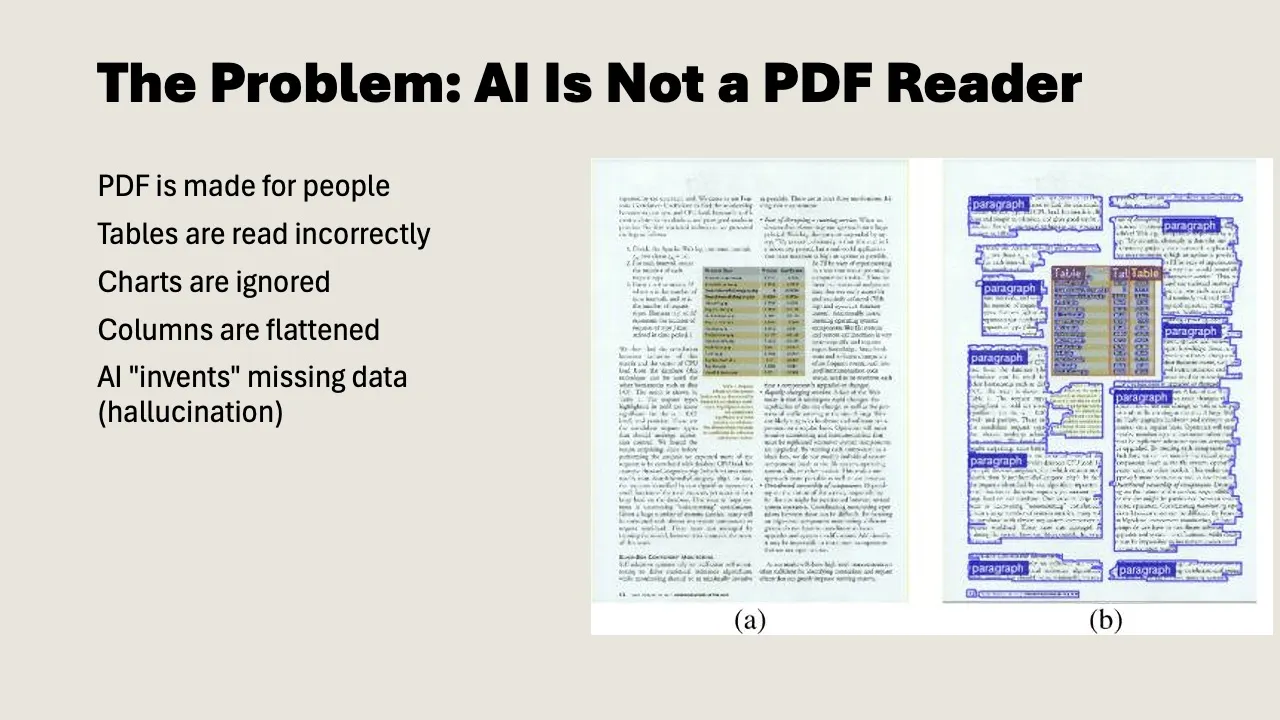
Here’s where most teams hit a wall. You have mountains of information: strategy decks in Google Slides, campaign reports as PDFs, rates in Excel, project plans in PowerPoint. The problem: those formats were made for people, not for AI.
PDF: unreliable for structured data
A PDF looks clear and organized to us. Nicely formatted, tables neatly aligned, logo in the corner. But for a language model, a PDF is a disaster. Tables shift, columns bleed into each other, numbers jump across pages. The model hallucinates numbers it can’t read properly. Prices, percentages, customer IDs: exactly the data that matters.
Plain text: a world of difference
Convert that same document to plain text with headings and structure (markdown or a Google Doc), and accuracy goes up dramatically.
Why? Language models are trained on text. They understand headings, bullet points, and tables in text format. They don’t have to guess where one column ends and the next begins. It’s the content that counts, not the formatting.
The practical approach
You don’t need to convert everything. Focus on your core documents: the 10 to 15 files you use most often. Your brand strategy, your campaign blueprint, your rates, your target audience profile. Make those AI-ready. The rest you can attach as needed.
There are several ways to convert. Have Google Slides? Let Gemini read them and convert to structured text. The model extracts the text and also describes what it sees in visual elements (charts, diagrams, photos). Have a PDF? Upload it and ask for conversion to “raw markdown.” But better yet: use the original source file (the Word document, the Google Sheet) and work from there. Export Excel and Sheets to CSV or copy as text. Tables in plain text work just fine.
Tip: set Google Docs to “pageless” mode (File > Page setup). You don’t need page breaks. It’s about the text, not how it looks on paper.
Two types of documents you need
In practice, you’ll quickly notice you’re building two different types of documents. They’re often confused, but the distinction matters.
1. Context documents
A context document describes the content: who you are, what you do, how you work. It’s the knowledge itself.
Examples:
- “This is brand X. The target audience is Y. The strategy for 2026 focuses on Z. Our KPIs are…”
- “This is our campaign team. Colleague A handles social, colleague B handles print. Our planning runs quarterly.”
- “Client A gets a 20% discount. This was decided in Q3 2025 by [name], reason: multi-year contract.”
That last point is important. Many organizations document what they decided, but not why. That discount lives somewhere in a spreadsheet, but the reasoning is nowhere to be found. The language model then assumes all clients get a 20% discount. That’s exactly the kind of mistake you want to prevent.
2. Navigation documents
A navigation document describes the structure: what lives where, how the knowledge base is organized, and which document wins when there are contradictions.
This is what Claude calls a CLAUDE.md file, and Gemini serves a similar function. It tells the model: “In folder 1 you’ll find customer data. In folder 2 you’ll find rates. The document rates-2026.md is the single source of truth for pricing.”
Single source of truth is a concept you’ll find yourself using a lot. If three places in your knowledge base say something different about course duration (twice three hours, three times two hours, twice 2.5 hours), you need to specify somewhere which document holds the truth. Otherwise the model picks at random and you get inconsistent output.
You stay in the driver’s seat
There’s a lot of hype about AI agents that work completely on their own. Answering emails, setting up campaigns, running analyses. In practice, it works differently.
The approach that actually works is somewhere in the middle: you stay in the loop. The model does the prep work: searching your knowledge base, retrieving relevant documents, drafting a first version. But you evaluate the result and decide what happens next.
That’s called “agentic” work. You give the model a task, it works independently (searches documents, creates sub-chats, compares sources), and comes back with a proposal. You say yes, no, or adjust this. The model continues. That’s how you collaborate.
This is also where the nuance lies. A language model can produce a campaign analysis, but it can’t judge whether that analysis holds up in your specific context. It can write a proposal, but it doesn’t know whether the tone fits that one client who always prefers more formal communication. That judgment stays with you.
And that’s not a shortcoming. That’s how knowledge work actually operates. In software, AI can build, test, find bugs, and try again. In consumer insights or campaign strategy, the value lies in human judgment. Your job changes, but it doesn’t disappear.
How to get started: four steps
Step 1: Inventory your core documents
Which 10 to 15 documents do you use most often? Think: brand strategy, campaign blueprint, target audience profile, rates, lessons from last quarter, team role assignments.
Step 2: Create a context document
Start with one document that describes who you are and what you do. Use it as a starting point for every AI interaction. You can write this manually, or have the model interview you: paste your strategy slides in and ask for a structured context document based on them.
Important: then go through it carefully. The model creates a solid first draft, but if there’s an error in your base document, it’ll propagate into everything you do with it. Have the people who own the knowledge review the document.
Step 3: Convert core documents to plain text
Take your strategy deck, your campaign report, your rates. Convert them from PDF or Slides to structured text. Headings, subheadings, bullet points. No formatting, no logos, no page numbers. It’s the content that counts.
Step 4: Organize and label
Create a folder structure. Give each folder a name that describes its contents. Write a navigation document that explains how the knowledge base is organized. For each topic, designate which document is the single source of truth.
Common mistakes
Most teams start too big. They want to convert everything at once. Don’t. Start with one context document and five core documents. Build out over time.
A second classic mistake: uploading PDFs and hoping for the best. They do work, but not reliably enough for tasks where accuracy matters. Convert your core documents.
Teams also tend to forget the nuance. The model reads what you give it. If nothing explains why a decision was made, the model won’t know either. Document the what and the why.
Set every context document to read-only, except for the owner. If everyone can edit, reliability disappears.
And finally: clean up contradictions. If two places say different things about course duration or rates, the model will trip up. Designate a single source of truth.
This isn’t automation
It’s tempting to see a knowledge base as a step toward automation. It isn’t. A knowledge base is a source of truth. How you work changes (faster, broader, with better first drafts), but what you do and why you do it remain the same.
Your responsibility shifts from figuring everything out yourself to evaluating and steering what the model produces. Your reach grows. You can do more. But it’s still your expertise that determines whether the output is right.
The investment isn’t in the tool. You probably have that already. The investment is in writing down what your team knows. That takes time, and it’s not the most glamorous work. But every hour you put in, you’ll earn back double on every project you tackle with AI going forward.